Test Mitsubishi and Omron PLCs from a Mac.
MC protocol and FINS, frame by frame.
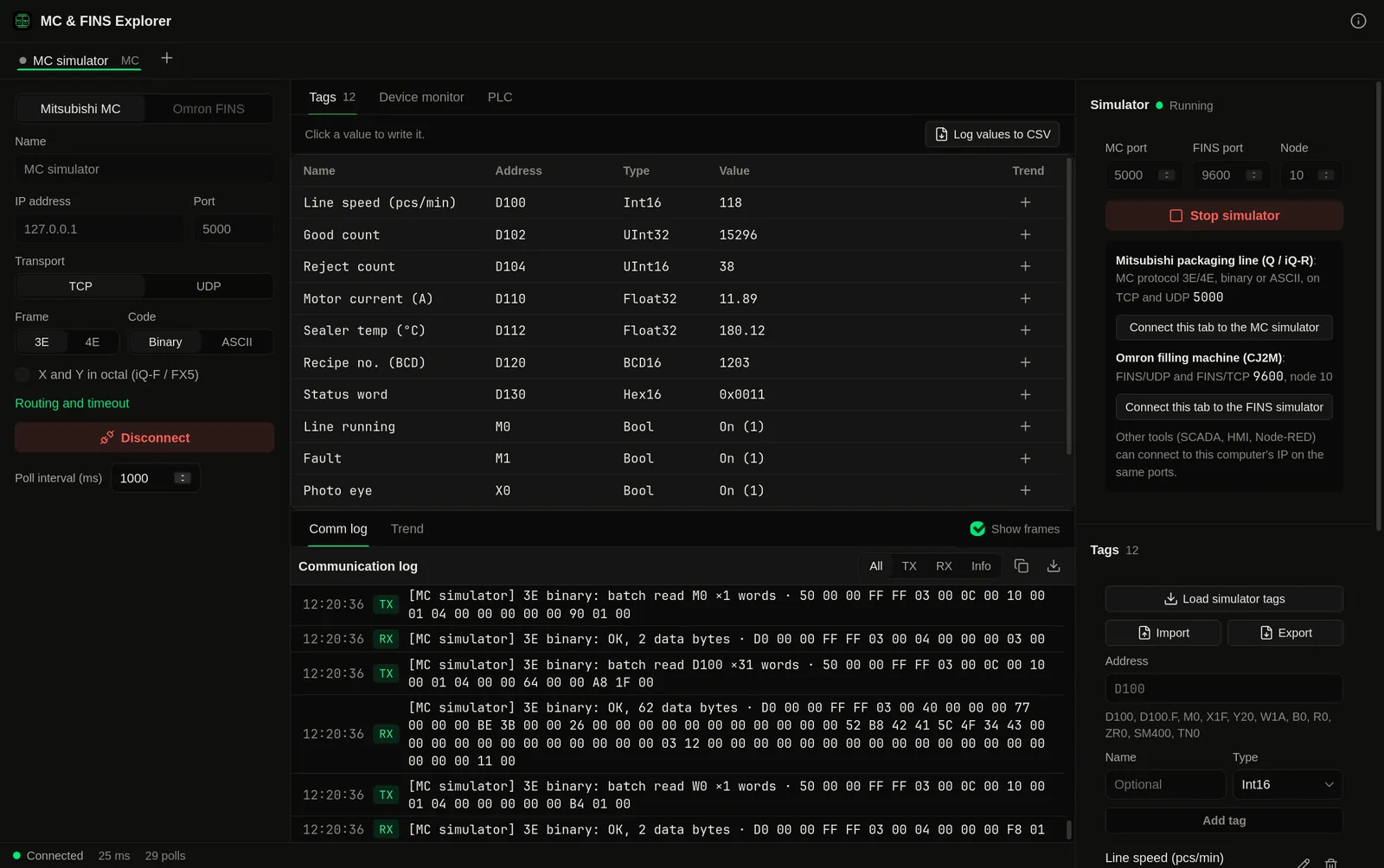
Connect to a MELSEC PLC over MC protocol (SLMP) or an Omron PLC over FINS, read and write D, M, DM and CIO, and see every request and response as a hex frame with the end code explained. When the PLC is not on your desk, a built-in simulator answers both protocols so you can test your SCADA, HMI or Node-RED flow.
You're on Windows: MC & FINS Explorer runs on macOS only, there is no Windows version yet.
Demo video
Watch the demo
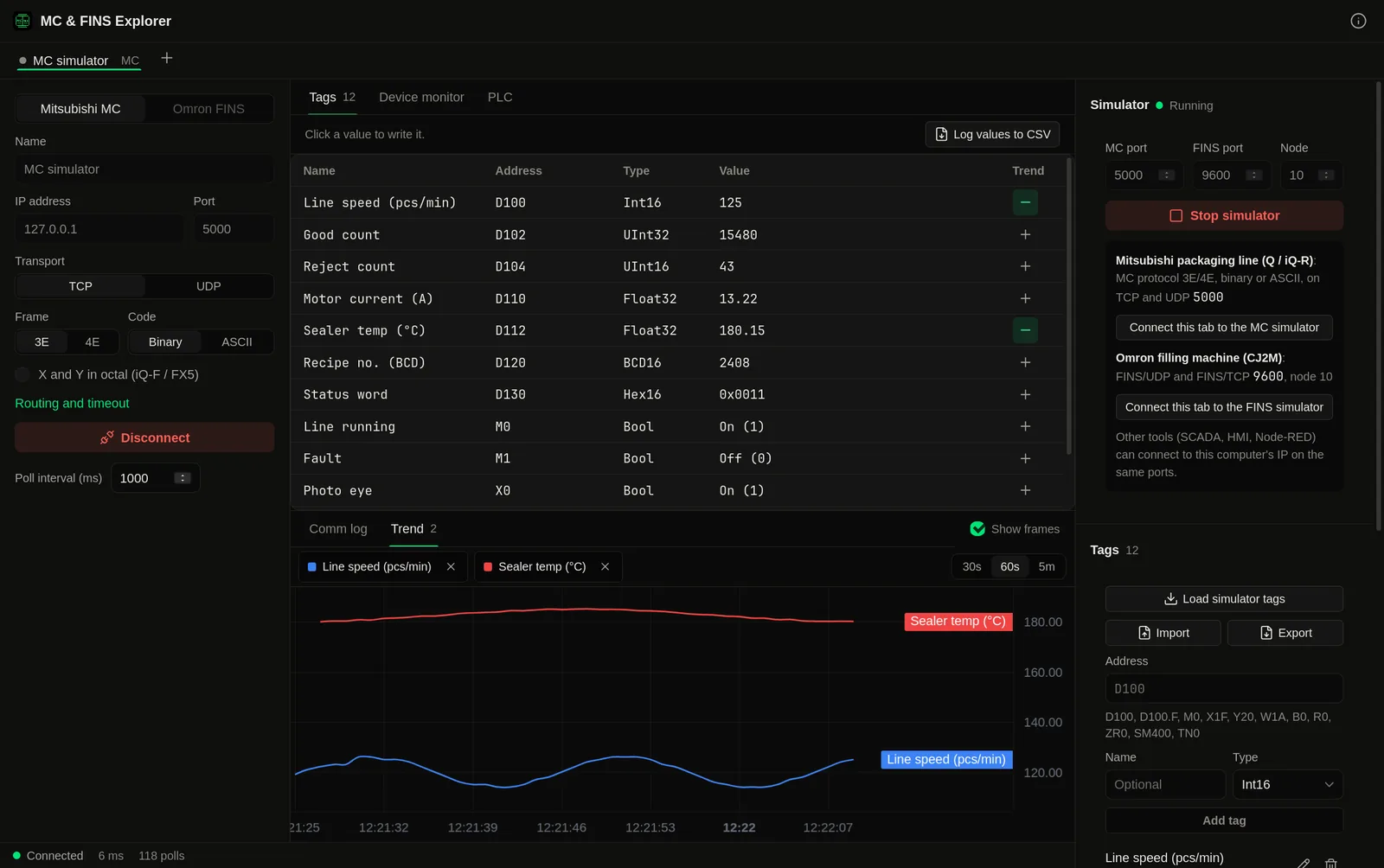
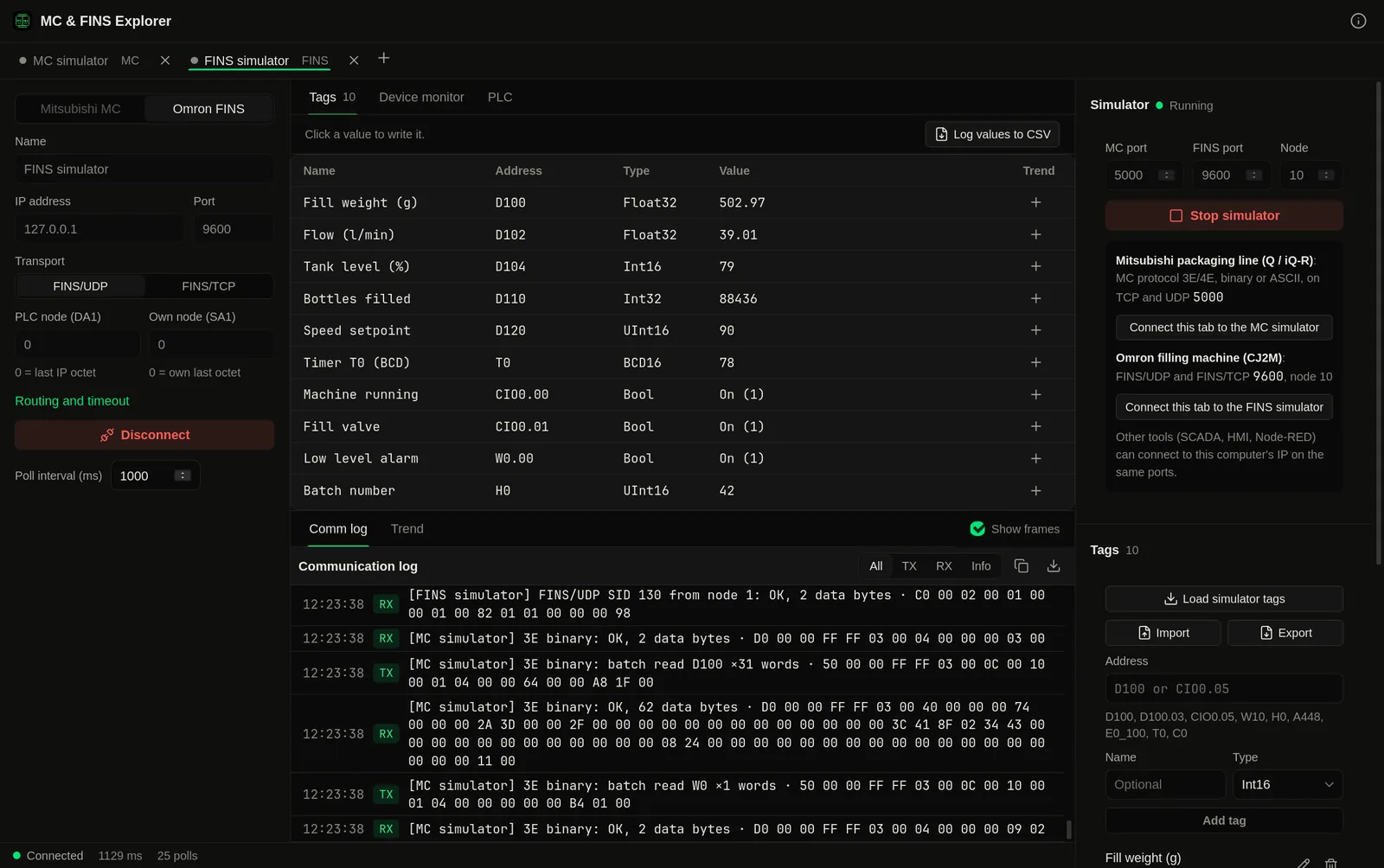
A tour of MC & FINS Explorer for Mac: live Mitsubishi tags over MC protocol with hex frames, a BCD write, live trends, the device monitor, CPU model and remote STOP and RUN, and an Omron filling machine over FINS in a second tab, all against the built-in PLC simulator.
Chapters
The Problem
No simple tester for MC protocol, and FINS tools from another era.
Mitsubishi and Omron PLCs run a large share of the lines in Indonesia and across Asia. When a SCADA driver or an HMI cannot read a Q-series PLC, there is no standalone tool to send one MC protocol request and look at the answer. For FINS there is old Windows freeware. So the question "is it the PLC settings or my driver?" turns into an afternoon with Wireshark and a manual.
Is the port even open?
Connect with the same frame, code and port your driver uses and see whether the PLC answers at all, and with what.
Error codes as numbers
C059, C056, 0401, 1103. The comm log shows each end code with what it means in plain words.
Engineering software on Windows
GX Works and CX-Programmer need a Windows PC. Checking a value or a connection should not.
No PLC to test against
The PLC is on site, the SCADA project is on your laptop. The simulator answers like a PLC from your Mac.
Features
A protocol tester and a PLC to test against, one native app.
Read and write devices
Mitsubishi D, W, R, ZR, M, X, Y, B, L, F, SM, SD, timers and counters. Omron DM, CIO, W, H, A, EM banks, timer and counter present values, and bits such as CIO 0.05 or D100.03.
Tag table
Name your addresses and pick a type: Bool, Int16, UInt16, Int32, UInt32, Float32, BCD16 or Hex. Values update live.
Device monitor
A live grid of a block of words, for example D100 to D163, so you can watch a whole recipe or status area change.
Comm log
Every request and response as a hex frame, with a decoded summary and the end code explained. Export to CSV and attach it to a support ticket.
PLC info and RUN/STOP
Read the Mitsubishi CPU model, or the Omron controller model, version and mode (RUN, PROGRAM, MONITOR). Pro adds remote RUN and STOP.
Trends and logging
Plot tags live and log values to CSV, with several PLCs connected at once. Pro.
Screenshots
See it in action
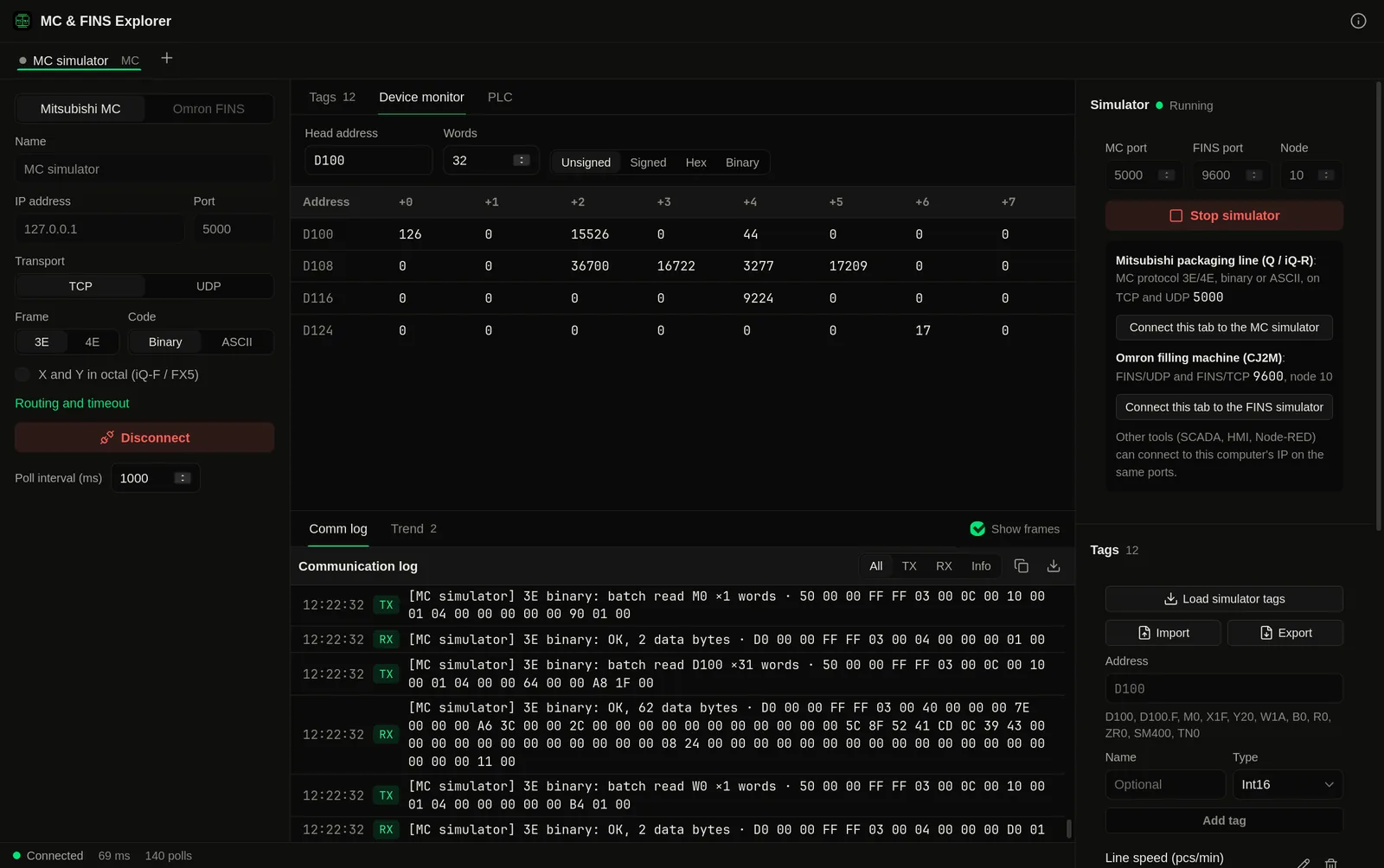
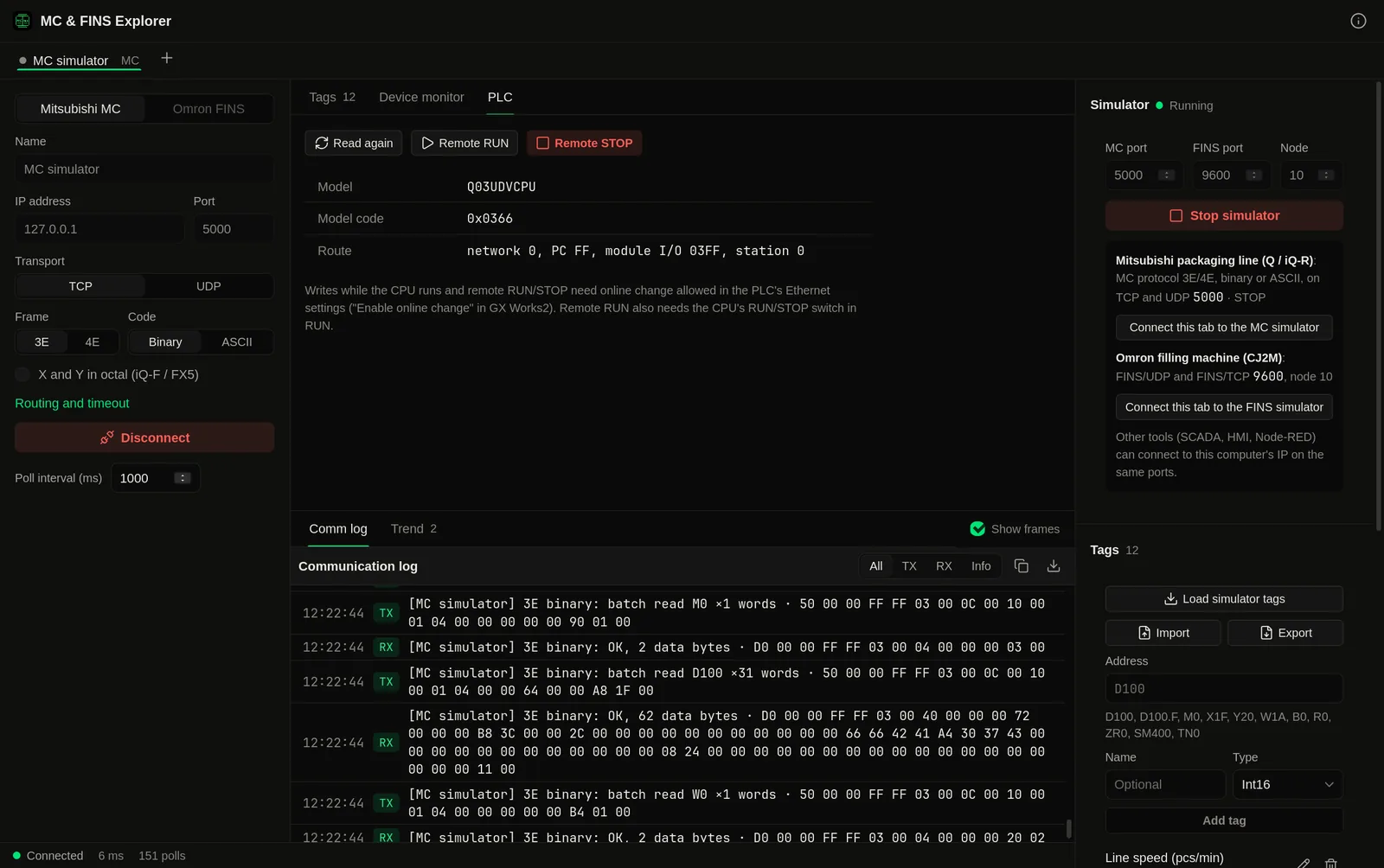
PLCs
MELSEC over MC protocol, Omron over FINS.
Mitsubishi MELSEC
iQ-R, Q series, L series and iQ-F (FX5) with built-in Ethernet or an Ethernet module. MC protocol (SLMP) 3E and 4E frames, binary or ASCII, over TCP or UDP. The default port is 5000; use whatever port is set in the PLC's open settings.
Omron
CJ1, CJ2, CP1, CS1 and NJ/NX with FINS enabled. FINS/UDP and FINS/TCP on port 9600, with the node numbers you set or the ones the PLC assigns over TCP.
Not supported yet
The older 1E frame used by FX3U-ENET-ADP and FX3U-ENET-L, MELSEC serial (C24) connections, and FINS over Host Link serial. If you need one of these, tell us at [email protected]: it helps us decide what comes next.
PLC simulator
A Mitsubishi and an Omron PLC on your Mac.
Start the simulator and your Mac answers MC protocol on TCP and UDP (3E and 4E frames, binary and ASCII detected from each request) and FINS on UDP and TCP. Two templates fill the memory with values that move: a Mitsubishi packaging line and an Omron filling machine. Point MC & FINS Explorer, your SCADA, your HMI or a Node-RED flow at the Mac's IP address and test the driver, the tag addresses and the screens before you go to site. Pro.
Demo without hardware
Show a customer a SCADA or HMI screen with live values from a laptop, with no PLC in the bag.
Test your own driver
Check that your code reads the right words, handles both frames and codes, and copes with error responses.
Made-up machines
The templates are made up to look plausible. They are not copied from a real machine or a real PLC program.
Part of: Field tools · Debug one device from your laptop: protocol apps, terminal database browsers, utilities.
Also in Field tools
-
Voltrus Tools
You want every protocol client and simulator in one Mac app instead of one app per protocol.
-
Voltrus Connect
You want your saved Modbus Poll and BACnet Explorer profiles on every device, or shared with your team.
-
Voltrus Modbus Poll
You need to read or write Modbus TCP/RTU registers, or simulate a slave.
-
Voltrus OPC-UA Explorer
You need to browse and read an OPC-UA server.
-
Voltrus BACnet Explorer
You need to discover BACnet/IP devices and browse their objects.
-
Voltrus S7 Explorer
You need to read or write a Siemens S7-300/400/1200/1500 from your laptop.
Free and Pro
Free to test. Pro for daily work.
MC & FINS Explorer is a free download for Mac, with an optional one-time Pro licence key ($29.99) for one Mac. No subscription.
Free
- One PLC at a time
- Both protocols and all frame options
- Up to 10 live tags
- Device monitor
- PLC info
- Comm log with hex frames and CSV export
Pro, $29.99 one-time
- Unlimited tags
- Writes, words and bits
- Several PLCs at once
- Live trends
- Tag list CSV import and export
- Value logging to CSV
- Remote RUN and STOP
- Built-in MC and FINS PLC simulator
FAQ
Common questions
Get it free
Mitsubishi and Omron, on your Mac.
MC & FINS Explorer is a free download for Mac. The DMG is signed and notarized by Apple, so it opens normally. An optional Pro licence key, $29.99 one-time, unlocks the Pro features below. The source is on GitHub under GPL-3.0.
Optional Pro, $29.99 one-time licence key
- Unlimited live tags (free: 10)
- Writes to words and bits
- Several PLCs connected at once
- Live trends
- Tag list CSV import and export
- Value logging to CSV
- Remote RUN and STOP
- Built-in MC protocol and FINS PLC simulator
Pro is a one-time purchase on the Voltrus Console. Your key arrives by email and in your console account. No subscription.
Requires macOS 13 Ventura or later, Apple Silicon or Intel. One Pro key activates one Mac and can be moved to another.
Mitsubishi Electric, MELSEC, iQ-R, iQ-F and SLMP are trademarks of Mitsubishi Electric Corporation. Omron, SYSMAC and FINS are trademarks of OMRON Corporation. MC & FINS Explorer is an independent tool, not affiliated with or endorsed by either company.
From one device to the whole line
Monitoring this PLC 24/7?
MC & FINS Explorer is built for commissioning and debugging. For round-the-clock monitoring use Voltrus OEE (hosted, live availability and downtime per machine) or Voltrus SCADA (dashboards, alarms and history on your own hardware).
Get new tools, releases and protocol guides by email. A few emails a month, unsubscribe anytime.
Could not sign you up right now. Please try again, or email [email protected].
Also from MacTools