Part of: Monitor & connect

Sell SCADA to your clients.
Keep the margin.

Voltrus SCADA is a single-binary industrial dashboard (Modbus, MQTT, OPC-UA, S7, EtherNet/IP, DNP3, BACnet) that replaces a multi-product SCADA stack. No Java. No SQL server. No Docker. Core is open source (AGPL-3.0) on GitHub; Enterprise features need a licence. Read-only by default. Runs on Linux and Windows.

Plant overview
Live capture
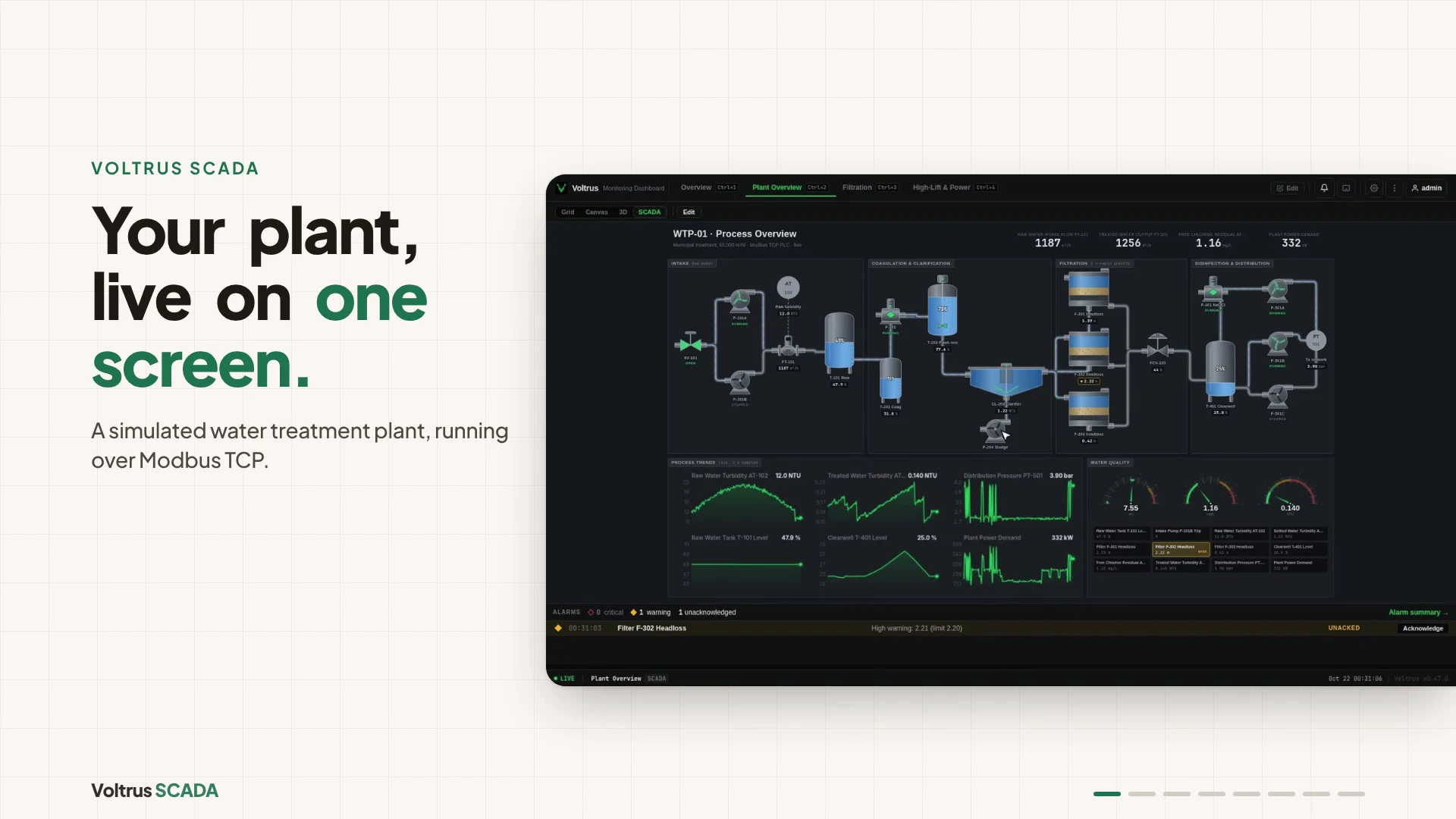
Water treatment plant: running pumps, backwashing filter, tripped pump in the alarm banner
3D plant twin
Same screen, in 3D
Built from the SCADA layout: live levels, spinning pumps, flowing pipes, tripped kit ringed in red
Equipment faceplate
Operate
State, alarm limits, recent trend, and arm-then-confirm Start/Stop
Filtration gallery
Live capture
Gravity filters on a shared header, backwash and air-scour flows, headloss trends
Pumping and power
Live capture
Duty, assist and standby pumps beside a 400 V MCC single-line
Screen editor
Build
Symbol library, grid canvas and inspector for tag binding
Video demo
1:07 video
Plant overview, 3D twin, confirm step, alarms, trends and the screen editor
Free
Open Source Core
0
Device / Tag Limits
$4 VPS
Min Hardware
1
Binary File

Demo video

Watch the demo

A simulated water treatment plant running in Voltrus SCADA: live plant overview, 3D twin, equipment faceplate with a confirm step, alarms, trend history and the built-in screen editor.

Chapters

Watch on YouTube

Your clients are paying thousands for systems that slow you down.

The usual pain points with legacy SCADA, from the integrator's side of the table.

Enterprise Pricing for a Small Site

SCADA pricing is built for big plants. Commercial platforms price by modules, tags or credits, so even a modest setup adds up fast. Your client's small site (a few pumps, a dozen valves, some instruments) doesn't justify enterprise pricing. But you pay it anyway.

Hours of Install Before the First Tag

Heavy platforms often need Java runtimes, a SQL server, and gateway configuration before your first tag. You spend more time installing than engineering.

Everything Requires a Plugin

Need OPC-UA? Add a module. Need a historian? Another license. Need MQTT? Another module. On module-priced platforms the quote grows with every module before your first tag reads a single register.

Your SQL Server Just Went Down. Again.

Store-and-forward setups built on a SQL server can struggle at scale. IT runs updates on weekends. SCADA is down Monday morning. You get the call. The usual fix is a Windows Server failover cluster, for a monitoring dashboard.

Operators Bypass Your System

Build a beautiful detailed screen. An operator hits the physical override instead because he can't figure it out at 2am during an alarm flood. If operators don't trust it, they route around it.

Your Client's PLC May Be Exposed

Modbus has zero authentication. Anyone on the network can read registers, write setpoints, stop pumps. Exposed PLCs and HMIs are easy to find with internet scanners like Shodan. Your client's next audit will flag this.

Core is free and open source. Add a licence only for the sites that need the extras.

No board meeting. No vendor evaluation committee. No year-long wait. Download it, deploy it, bill your client tomorrow.

Three steps. Zero dependencies.

No installer. No runtime. No configuration wizard. Download, edit a YAML file, run.

01

Download the Binary

Single file for Linux or Windows. No installer. No Java. No Node.js. Copy it to your server or VPS. chmod +x and you're done.

02

Edit the Config

Add device IPs, register addresses, polling intervals, and alarm thresholds in one YAML file, or in the UI. Scan a subnet from the dashboard to find Modbus TCP devices and add them in one step.

03

Run It

./voltrus: the embedded database is created, the poller starts, and your dashboard is live on port 3000. First start takes about 0.15 seconds on a small VPS.

ISA-101 operator screens, drawn in the browser.

Equipment stays grey while the process is normal. Colour appears only when something needs an operator. Drag from a 31-symbol library, bind tags, and pipe nozzle to nozzle. Every capture below is the shipping product polling a simulated Modbus PLC once a second, not a mockup.

Voltrus SCADA plant overview of a water treatment plant: intake pumps, clarifier, three gravity filters with one in backwash, clearwell and high-lift pumps, live trends, water quality gauges, an annunciator panel and an alarm banner listing a tripped pump and a filter headloss alarm
Plant overview, 50,000 m³/d water treatment. Running pumps turn green, pipes animate while they flow, filter F-301 is backwashing, and the tripped intake pump P-101B flashes red while its alarm waits in the banner for acknowledgement.
Faceplate for high-lift pump P-501A showing RUNNING state, a recent trend, run feedback and an armed Confirm STOP command

Faceplates with armed commands

Click any equipment for its faceplate: state, alarm limits, a recent trend and related run and fault tags. Start and Stop take two clicks, arm then confirm, so a stray click never moves a pump. Writes stay off until you enable them per tag.

Filtration gallery screen with three gravity filters on a settled-water header, turbidity analysers, backwash pump and air-scour blower headers, and headloss and turbidity trends

Process you can watch

Filter beds show backwash as it happens and headers flow only while the pumps feeding them run. Trends fill from history the moment a screen opens, so operators never stare at an empty chart.

High-lift pumping and electrical screen: clearwell feeding three duty, assist and standby pumps, discharge valves, pressure and flow instruments, and a 400 V MCC single-line with transformer, energised busbar, breakers and motors

Single-lines from the same library

Busbars energise from bus voltage, breakers draw open or closed, and feeders tap the bar where they meet it. Pumping and power share one screen and one set of symbols.

Voltrus SCADA screen editor with the symbol library on the left, the overview screen on a grid canvas in the middle, and the inspector on the right binding the clarifier to its turbidity and rake-drive tags

An editor, not a config file

Symbols, widgets and tags dock on the left. Tag binding, fault and run tags, rotation and mirroring sit on the right. Undo, copy and paste, arrow-key nudging, zoom to fit, and screens drawn on a fixed 1920 × 1080 stage that scales to any monitor.

Close-up of the Voltrus SCADA 3D plant twin: the selected clarifier ringed in cyan with its faceplate open, a sludge pump, coagulant tank and gravity filter cells with handrails

The same screen as a 3D plant twin

Switch any SCADA screen to 3D and it becomes a plant you can orbit and fly through, built from the same layout and tags: tanks fill and drain, pumps spin, the clarifier bridge turns, filters bubble through backwash, and tripped equipment pulses red. Click anything to fly to it and open the same faceplate as the 2D screen.

Built to deploy fast and run forever.

One binary and one YAML config: protocols, alarms, history and auth included.

01

Single Binary Deployment

No heavy runtimes. No dependency bloat. One compiled binary plus one config file. Linux x86_64, Linux ARM64 and Windows x86_64. Copy, run, done.

02

Runs on Raspberry Pi

A Linux ARM64 (aarch64) build ships with every release, so a Raspberry Pi on a 64-bit OS runs the same single binary. The backend, embedded database and live data stream use less RAM than a single browser tab.

03

7 Industrial Protocols

Native Rust drivers: Modbus TCP, MQTT, OPC-UA, Siemens S7, Allen-Bradley EtherNet/IP, DNP3, and BACnet/IP. No Kepware. No middleware. No translation layers.

04

Enterprise Auth & SSO

Local auth with Argon2 hashing and role-based access control with a full audit trail are in Core. An Enterprise licence adds SSO with Active Directory (LDAP over TLS), Azure AD (Entra ID), Okta, SAML 2.0 and OIDC.

05

Data Flow Engine

Rule-based automation with 11 node types and 3 trigger types (Modbus, timer, MQTT). Build logic like "when tank exceeds 80%, stop pump and send alarm", without touching PLC code.

06

Simulation & Go-Live Mode

Test your entire config with simulated device data. Verify dashboards, alarms, and flows before switching to production with one click. If devices don't come online, roll back to simulation in one click, or let it roll back automatically after a grace window.

07

Gorilla Data Compression

Full-resolution history is packed with delta-of-delta timestamps and XOR-encoded values, run-length encoding for digitals, and an optional per-tag deadband. Our demo plant stores about 2 bytes per sample instead of 64 as plain rows. No external historian needed.

08

OT Asset Inventory

Auto-populated device inventory with firmware tracking, IP conflict detection, SNMP scanning, maintenance logs, and NIS2 compliance export. Kill the spreadsheet.

09

Alarm Management

Non-repeating alarms, shelving with auto-restore, priority tiers, deadband on alarm points, and alarm analytics, so operators see fewer, more useful alarms.

10

White-label Ready

With an Integrator or Enterprise licence, set a custom title, logo and theme through the UI. Your clients see your brand, not ours. Present Voltrus as your own solution and keep the relationship.

11

Developer SDKs & API

Official Python and TypeScript SDKs for the OpenAPI 3.1 surface. WebSocket streaming with MessagePack. Interactive Scalar API docs. Read tags, write setpoints, subscribe to alarms.

12

AI Engineering Copilot

AI helps you configure faster: auto-map Modbus registers from datasheets, generate dashboard layouts, suggest alarm thresholds. Engineer reviews everything before deploy. BYOK or $19/month.

See Pricing: Core Is Free

Open source under AGPL-3.0. No licence key and no credit card needed for Core.

Numbers that speak for themselves.

Measured on a $4 VPS. The btop capture below shows the running process.

$4 VPS
Minimum Hardware
Service, embedded database and live stream on one small instance.
~2 ms
Added Latency
A changed value reaches the browser about 2 ms after the poll that reads it (median, 2 vCPU VPS). Poll intervals go from 1 ms to 1 hour per device.
0.15 s
Cold Start
First start on a 2 vCPU VPS, creating the embedded database included. Restarts take about 0.05 s.
30 MB
RAM at Idle
Resident memory of the SCADA process after start, in the btop capture below.
btop system monitor on a $4 VPS filtered to the Voltrus SCADA process, using 30 MB RAM after start
btop on a $4 VPS: Voltrus SCADA process highlighted at 30 MB RAM after start

Built for integrators, not enterprise sales teams.

Factor
Traditional SCADA
Ignition
DIY Stack
Voltrus
Licensing
Per-site license plus annual maintenance
Base license, modules extra
Free, but you pay with your time
Free open source Core (AGPL-3.0). Optional Integrator and Enterprise licences, per site.
Recurring Fees
Annual maintenance contract
Annual support / upgrade plan
Free, but your time isn't
$0 for Core. Paid licences can be lifetime, so a subscription is optional.
Setup Time
Days of configuration
Java, SQL, and gateway setup
Hours to days wiring tools together
5 minutes. One binary, one config.
RAM Usage
Several services running side by side
JVM, SQL, and gateway processes
Multiple containers
30 MB at idle in the btop capture above
Dependencies
Heavy runtimes, external DBs, brokers
Java JVM, SQL Server, gateway process
Node.js, Docker, InfluxDB, Grafana, MQTT
Zero. Standalone executable.
Security Posture
Often open by default: all protocols, all users
Role-based but complex to configure
You secure it yourself
Passive by default. Writes are opt-in.
Security Surface
Proprietary, closed
Java runtime patching
Open source: you audit it
Rust memory safety. No JVM. No Java.
OEE / Downtime Tracking
Often an extra paid module
OEE module: additional license
Build it yourself in Grafana
Built into the free Core
For <500 Tags
Massive overkill
Expensive overkill
Fragile overkill
Perfectly sized.

Free SCADA can cost your time. Voltrus Core is free and open source, with the stack already integrated.

FUXA, Node-RED + Grafana stacks and freemium SCADA look cheap until your client calls at midnight and you are the one maintaining the stack. Voltrus Core is one binary with alarms, historian and auth included, and it never phones home. Only the Enterprise features need a licence.

Part of: Monitor & connect · See the plant: dashboards and alarms, machine OEE, remote access, messaging.

How Voltrus SCADA differs from…

  • Voltrus OEE Line

    Voltrus OEE Line is hosted and billed per line ($19 per month, up to 3 machines), focused on availability, performance and quality. SCADA is self-hosted, with a free open source core.

  • MacTools suite

    MacTools apps commission and debug one device from a laptop. SCADA monitors continuously.

Not sure? See which one you need →

Free core. Pay only for Enterprise features.

Core is open source (AGPL-3.0) on GitHub and needs no licence. Integrator and Enterprise licences unlock the extra features: buy a lifetime key per site, or pay per site per month. Prices are in USD.

Core
Free
Open source, AGPL-3.0. No licence key.
  • All protocols: Modbus, MQTT, OPC-UA, S7, EtherNet/IP, DNP3, BACnet
  • No device, tag or retention limits
  • Local auth + role-based access control
  • Alarms with shelving, deadband and analytics
  • Historian and trends
  • OEE / downtime tracking
  • REST API + Python and TypeScript SDKs
  • Never phones home
Enterprise
Enterprise
$999
Lifetime per site, or $79 per site per month
  • Everything in Integrator
  • SSO: Active Directory (LDAP), Azure AD, Okta, SAML 2.0, OIDC
  • 21 CFR Part 11 mode: e-signatures, record checksums, to support Part 11 workflows
  • IEC 62443 audit mode: security event logging to support audits
  • Hot standby with automatic failover
  • RTSP video
  • Priority support with SLA

Core is free. You only pay when a site needs Integrator or Enterprise features.

Lifetime keys do not expire. Monthly keys keep Enterprise features for 7 days after a lapse, then the install falls back to Core, which is never limited by licence state and never phones home. Source: github.com/VoltrusID/voltrus-scada.

Questions integrators ask.

Core is free and open source (AGPL-3.0). It has all seven protocols, alarms, historian and trends, OEE, local auth with role-based access control, the REST API and SDKs, with no device, tag or retention limits. Integrator ($249 lifetime or $19 per site per month) adds white-label with a theme editor, scheduled PDF reports by email, Telegram and WhatsApp alarm notifications, a multi-site hub and standard support. Enterprise ($999 lifetime or $79 per site per month) includes everything in Integrator plus SSO (Active Directory over LDAP, Azure AD, Okta, SAML 2.0, OIDC), a 21 CFR Part 11 mode and an IEC 62443 audit mode (both are support workflows, not certifications), hot standby with automatic failover, RTSP video and a priority support SLA.

The core is. It is published under the AGPL-3.0-or-later at github.com/VoltrusID/voltrus-scada, and it needs no licence key. The Integrator and Enterprise features are a separate proprietary add-on that a licence key unlocks. An unlicensed install is simply Core, fully working.

Yes. You can run Core on your own servers, for yourself or for your clients, and change the source. The AGPL adds one rule beyond the usual open source terms (section 13): if you modify Core and other people use your modified version over a network, you must offer those users the source of your modified version under the same licence. Running unmodified Core does not trigger that rule. This is a plain-language summary, not legal advice; read the licence or ask a lawyer about your case.

Not in Core. There are no device, tag or data retention limits, and no licence middleware that blocks the application. The older Engineering mode (a few devices and limited polling hours) has been removed.

Enterprise features keep working for a 7 day grace period after the paid period ends. After that the install falls back to Core. Your data and configuration stay in place and Core keeps running, because a licence state never limits Core. Renewing restores the features: installs that are online can refresh their activation, and offline installs can import a new activation file.

No. Core never phones home and runs fully on your client's local network, with no cloud dependency. A paid licence is activated with a signed file, so it works offline too.

Yes, with an Integrator or Enterprise licence. White-label and the full theme editor let you set the title, logo and colours so your clients see your brand, not ours.

Linux on x86_64 or ARM64 (aarch64, including a Raspberry Pi on a 64-bit OS), or Windows x86_64. No dedicated server needed. Works on existing hardware.

All of them are in Core: Modbus TCP, MQTT, OPC-UA, Siemens S7, Allen-Bradley EtherNet/IP, DNP3 and BACnet/IP. Power meters, solar inverters, PLCs, industrial sensors: full register flexibility with configurable polling intervals.

Core includes local auth with Argon2 password hashing and role-based access control. An Enterprise licence adds SSO with Active Directory (LDAP over TLS), Azure AD (Entra ID), Okta, and any SAML 2.0 or OIDC provider, with no separate license server.

Core updates come from the GitHub releases and you can build from source. Lifetime licences include updates with no annual renewal. Integrator includes standard support. Enterprise adds a priority support SLA. We reply to every support email within two business days.

Yes. You can deploy Core for client sites under the AGPL terms, bundle it with your services and charge what the market bears. When a client needs the licensed features, buy an Integrator or Enterprise licence for that site.

One binary. No middleware.

The entire stack in a single compiled executable. Your clients' data never leaves their network.

Voltrus architecture diagram showing a single binary with embedded protocols, database, and web UI, compared to traditional multi-component middleware stacks

No External Database

SQLite embedded directly in the binary. No SQL Server to install, no Postgres to tune, no connection strings to debug. History is packed with Gorilla compression and rolled up in tiers, so the database stays small.

No Middleware Stack

Protocol drivers, web server, database, WebSocket engine, alarm engine, all compiled into one Rust binary. No Kepware, no MQTT broker, no Node-RED, no Grafana. One process replaces them all.

Passive by Default

Read-only monitoring out of the box. Write commands, setpoints, and control actions are explicit opt-in per tag: not a permission you grant by accident. Modbus has no built-in security. Our posture does. No unauthenticated writes. No Shodan surprises.

Built-in Historian: No Module Needed

Many platforms sell the historian as a separate module with its own setup. Ours is built into the embedded SQLite database: full resolution for 90 days, packed to about 2 bytes per sample, then hourly and daily rollups. No historian module. No separate license. No setup.

Drive SCADA from your own code.

Official Python and TypeScript clients for the SCADA REST API, with types modeled on the server's OpenAPI 3.1 spec. They live in the open source repository under sdks/; they are not on PyPI or npm yet.

The full 24/7 workflow runs from your own scripts and services: poll devices on a fixed interval, acknowledge and shelve alarms, queue audited tag writes, pull OEE metrics, and generate reports without opening a browser. For unattended use, both SDKs ship an always-on example (devices_24x7.py, devices-24x7.ts): fixed-interval polling that retries transient errors instead of crashing.

Python SDK

Hand-written and typed, urllib3 as the only dependency. Python 3.9+. Live data, history, alarms, per-protocol devices (Modbus, OPC-UA, S7, EtherNet/IP, DNP3, BACnet, MQTT), commands, OEE, screens, reports, analytics, and admin API keys.

from voltrus import VoltrusClient

client = VoltrusClient("http://your-server:3000", api_key="vt_...")

print(client.get_version())

for v in client.get_live_data(screen_id="overview"):
    print(f"{v.key}: {v.value:.2f} ({v.status})")

Python 3.9+ · urllib3

TypeScript SDK

For Node.js 18+ and the browser, using the same API the bundled web UI uses: system health, live data, history, alarms, per-protocol devices, audited tag writes, OEE, screens, and reports.

import { VoltrusClient } from "voltrus";

const client = new VoltrusClient({
  basePath: "http://192.168.1.100:3000", // default server port is 3000
  apiKey: process.env.VOLTRUS_API_KEY,
});

const live = await client.system.getLive();
for (const device of live.devices) {
  console.log(device.device_id, device.status, device.metrics);
}

const readings = await client.data.getData({ screen: "overview" });
for (const reading of readings) {
  console.log(`${reading.key} = ${reading.value}`);
}

Node.js 18+ · browser

Tag writes are queued, audited, and enforced by the server's write policy (value range, deadband, rate limit, mandatory reason). API keys are read-oriented; writes run under a login session.

Embedding the protocol layer into your own service? See the Gateway SDKs.

Ready to own your stack?

Core is open source (AGPL-3.0) on GitHub. Enterprise features need a licence. Deploy it for your clients and keep the margin.

Core: free
No device, tag or retention limits. Integrator from $249 lifetime or $19/site/month.

Already purchased? Activate your license

Built by JoyoDigitama · Malang, Indonesia