 Voltrus
OEE Line
Voltrus
OEE Line
OEE and downtime for one line, from a tap on a phone.
Operators tap Running, Idle or Down and count good and scrap pieces. Supervisors see OEE, downtime by reason and a shift report, without installing anything.
One line, up to 3 machines. After the trial it is $19 per month, or Rp 299.000 with QRIS.
From sign-up to first numbers in one shift.
Sign in and start the trial
Use your Voltrus account. The 14-day trial starts at checkout and the card is not charged until day 14.
Add your machines and shifts
Up to 3 machines with an ideal cycle time each, your shifts and break minutes, and your downtime reasons.
Share the operator link
Operators open a link on their phone. No account, no app to install.
Read the numbers
Live OEE, downtime by reason, and a shift report as PDF or CSV for the daily meeting.
Built for a thumb, on the shop floor.
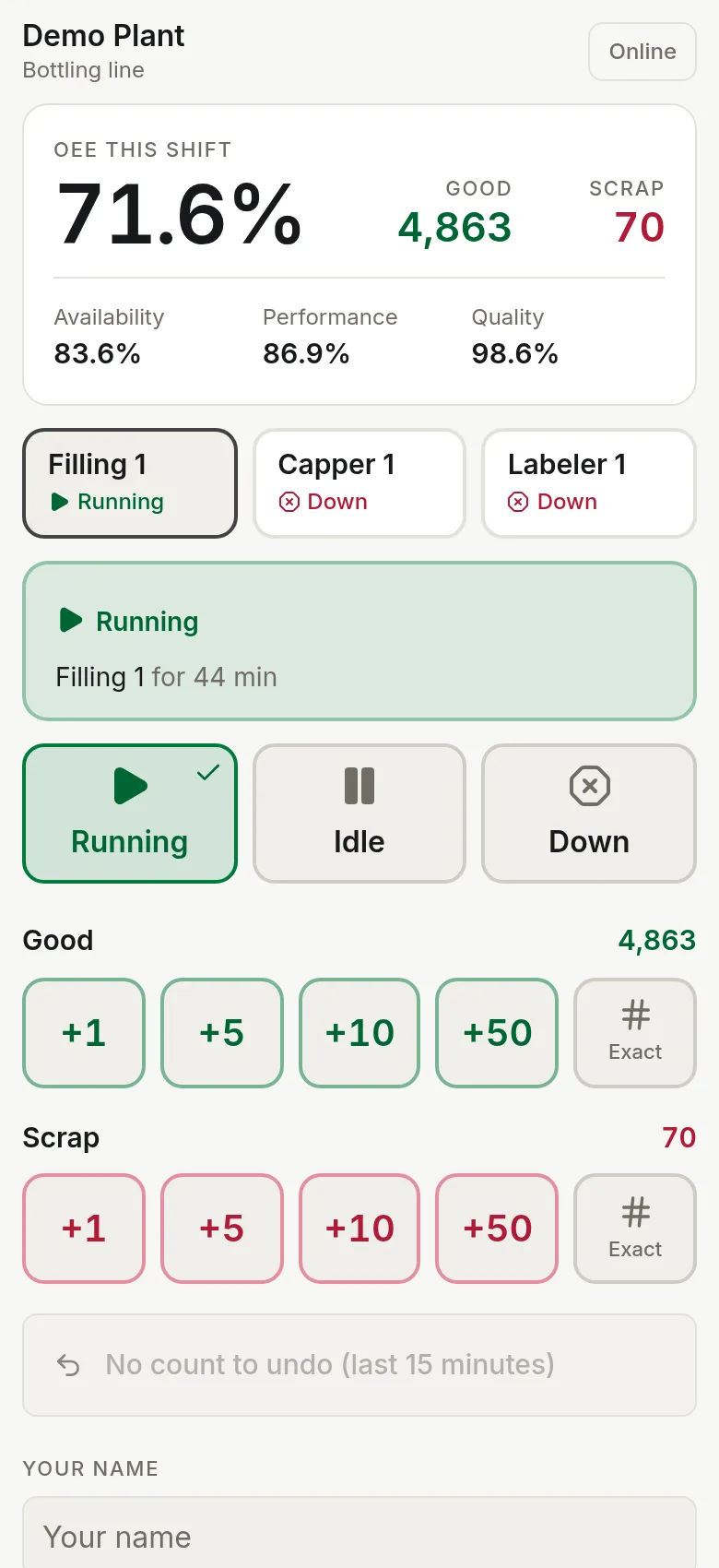
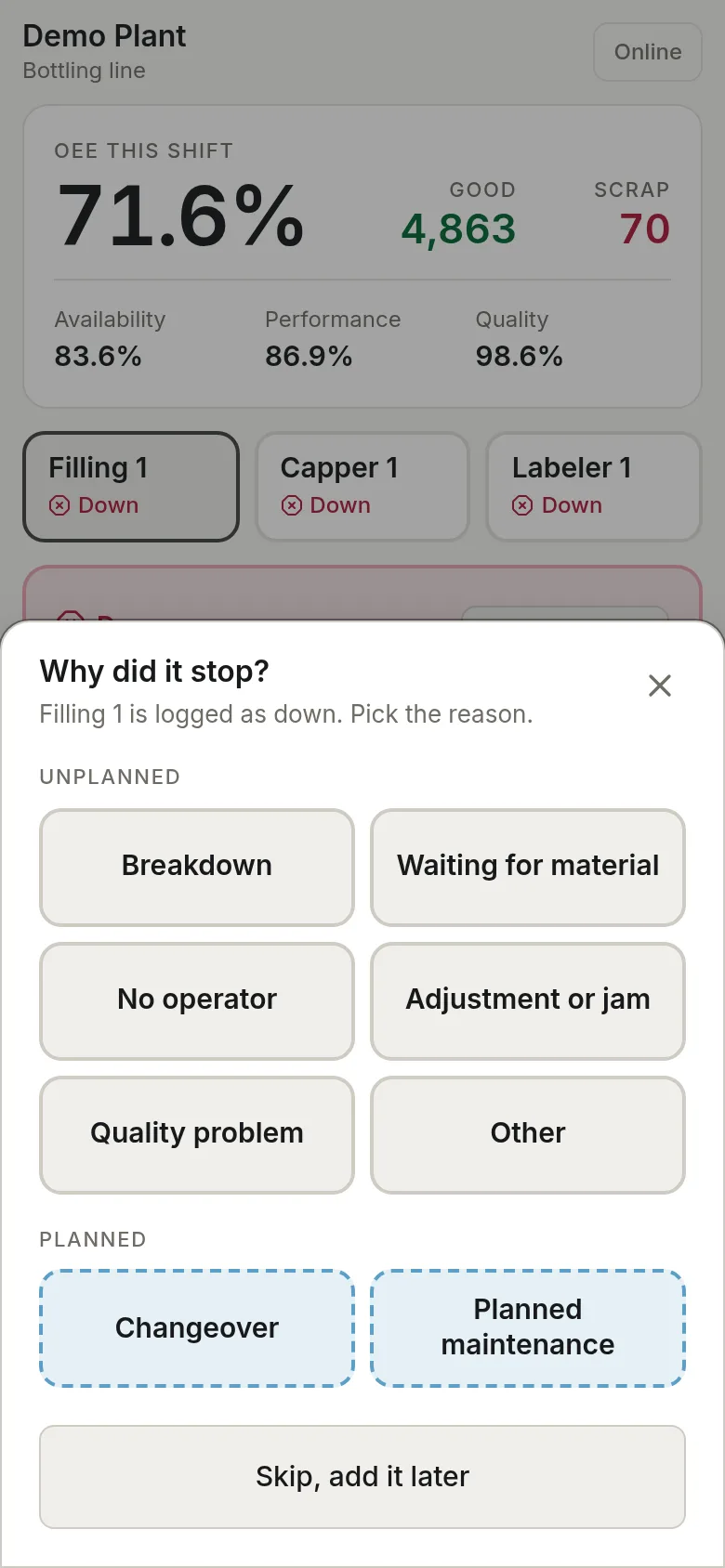
The operator page has large buttons that work with one hand. A stop starts the moment Down is tapped, and the reason can be picked right away or filled in later by a supervisor.
- ✓Running, Idle and Down with the time in state
- ✓Reason grid for stops, planned stops shown apart
- ✓Good and scrap counters with +1, +5, +10, +50 and an exact number keypad
- ✓Undo the last count for 15 minutes
- ✓Counts made offline are sent when the connection returns
Where the hours went, shift by shift.
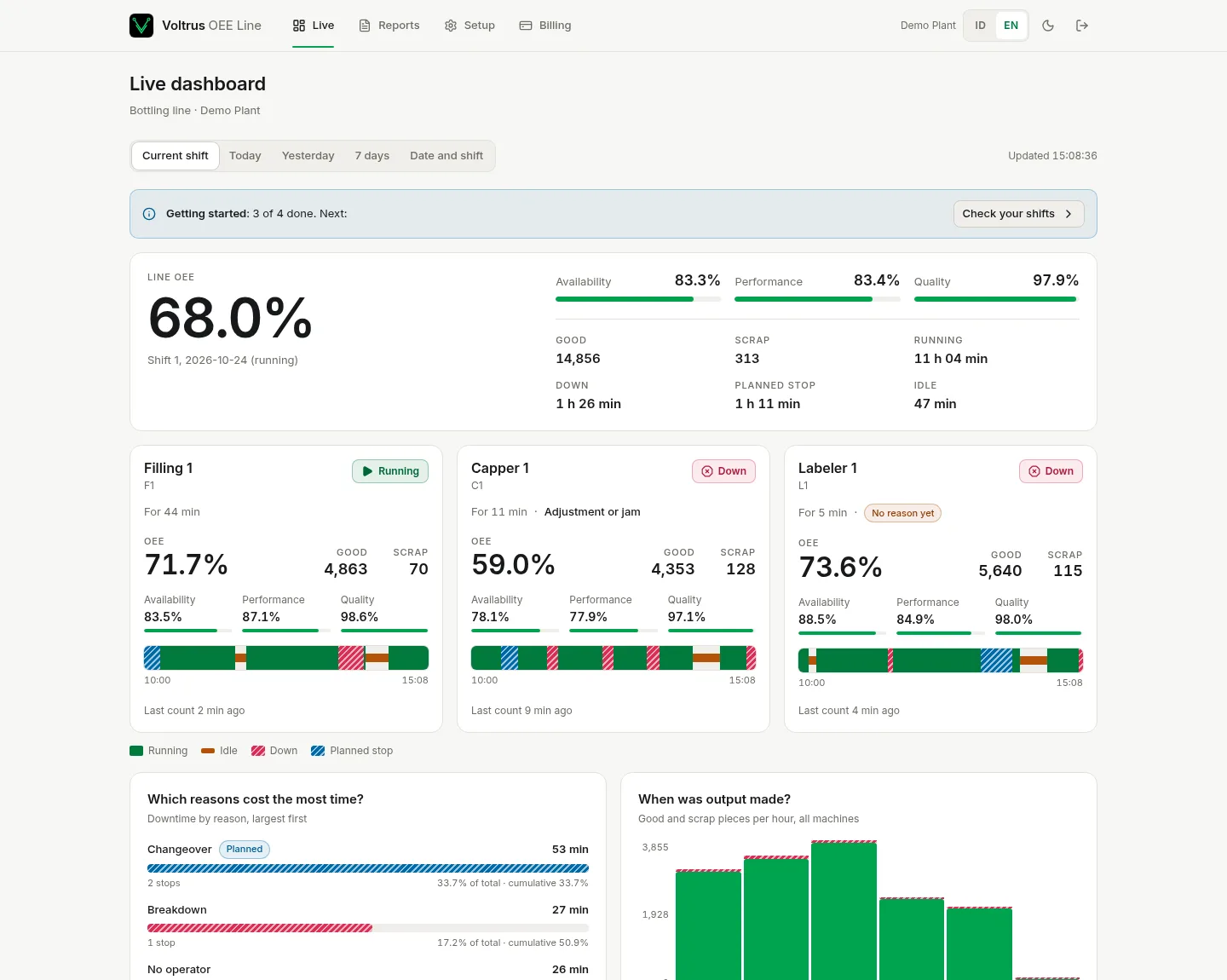
The dashboard shows line OEE with availability, performance and quality, a card per machine with its timeline, and a Pareto of downtime by reason.
- ✓Current shift, today, yesterday, 7 days or any date and shift
- ✓Planned stops such as changeover are taken out of planned time
- ✓Fix a missing reason after the fact
- ✓Void a count that was keyed wrong
A shift report you can print.
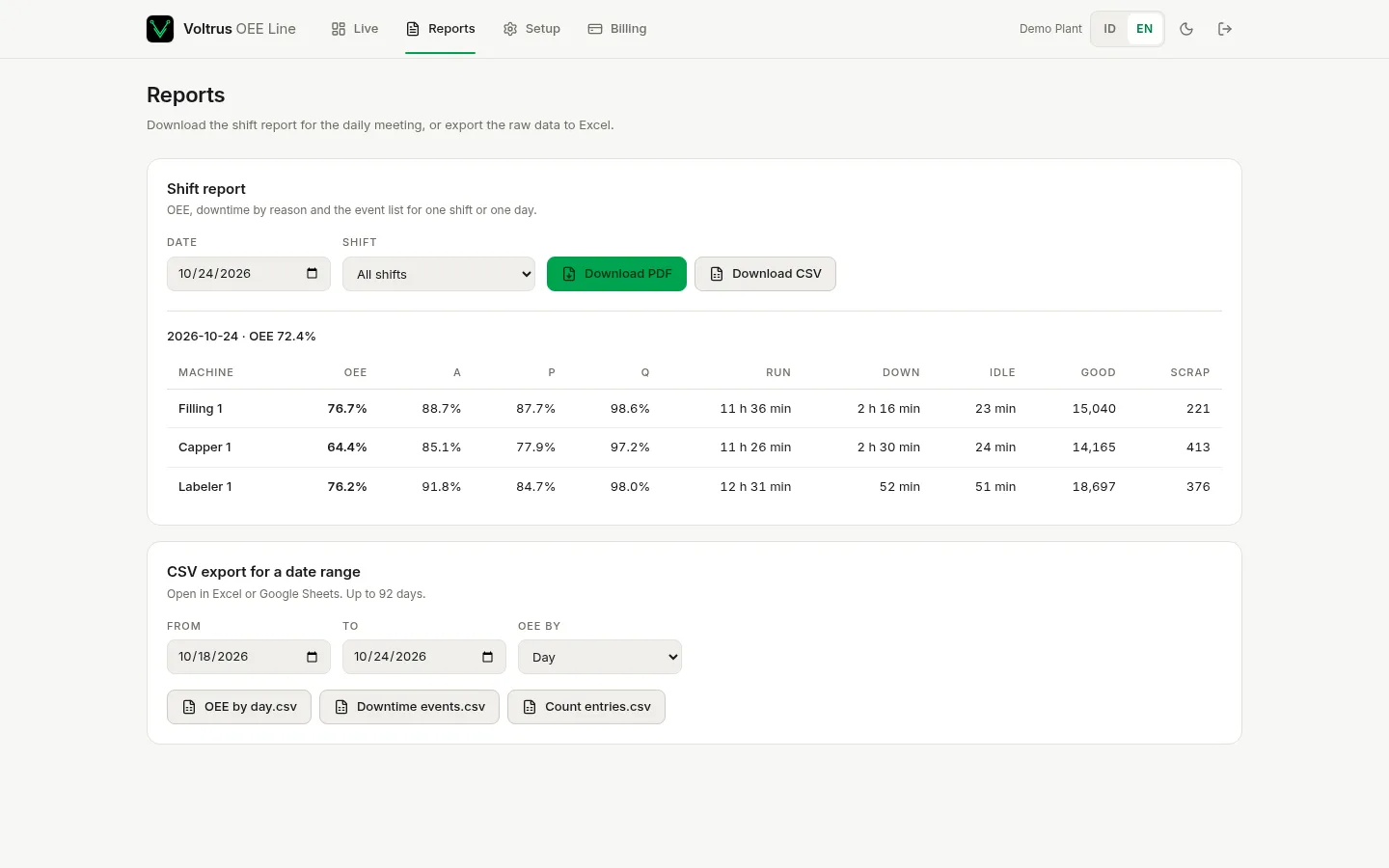
Download the shift report as PDF or CSV for any date and shift. CSV exports cover OEE by day or shift, every downtime event and every count entry, ready for Excel or Google Sheets.
Everything a single line needs.
Machine states with reasons
Running, idle and down, with reason codes you edit. Planned and unplanned stops are kept apart.
Downtime tracking
Every stop has a start, an end, a reason and who logged it. Edit a reason or a time afterwards.
OEE you can check
Availability x performance x quality for each machine and for the line, with the formula written out in the docs.
Shift reports
PDF and CSV per shift or per day, with downtime by reason and the event list.
Email alerts
When a machine has been down longer than the minutes you set, the workspace members who opted in get an email.
Team and operators
Add up to 10 people by email. Operators use a phone link and need no account.
HTTP ingest
Push states and counts from a PLC, the Voltrus Gateway or a script with one JSON POST.
Separate workspaces
Every workspace is isolated from every other. Sign in with your Voltrus account.
Counts can come from a machine.
Manual taps work with no hardware. If a PLC or gateway already counts pieces, it can push them to your workspace with an API key. Send running totals and OEE Line turns them into counts.
curl -X POST https://oee.voltrus.id/line/api/ingest \
  -H "X-API-Key: vlk_YOUR_KEY" \
  -H "Content-Type: application/json" \
  -d '{"machine":"F1","state":"running","good_total":5021,"scrap_total":40}'
There is no built-in MQTT listener. To use MQTT, bridge the topic to this HTTP endpoint with Node-RED or a small script. The Voltrus Gateway exposes gRPC, so a short script does the push.
Plain limits.
- ▸One line and up to 3 machines per workspace. More machines or lines are not sold on this plan.
- ▸It measures the machines. There are no work orders, no lot traceability and no inspections.
- ▸No hardware is included. Operators tap on a phone, or a PLC or gateway pushes counts.
Part of: Monitor & connect · See the plant: dashboards and alarms, machine OEE, remote access, messaging.
How Voltrus OEE Line differs from…
-
Voltrus MES
OEE measures the machines. Voltrus MES runs the production: work orders, output and scrap against orders, traceability.
-
Voltrus SCADA
Voltrus SCADA is self-hosted with a free open source core, with dashboards, alarms and history. OEE is hosted: no servers to install.
One plan.
- ✓ 14-day free trial (card checkout)
- ✓ Up to 3 machines on one line
- ✓ Up to 10 people plus operator phone links
- ✓ Shift reports as PDF and CSV
- ✓ Email alerts for downtime
- ✓ HTTP ingest for PLCs and scripts
The trial starts at checkout. Your card is not charged until day 14, and you can cancel before then.
In Indonesia you can pay Rp 299.000 per month with QRIS, through your Voltrus console balance. QRIS payments have no trial and cover one month at a time.
Questions
Do I need a card for the trial?
Yes. The 14-day trial runs through card checkout, and the card is charged only if you stay after day 14. You can cancel any time before then.
Can I pay with QRIS instead?
Yes, Rp 299.000 per month, paid with QRIS through your Voltrus console balance. QRIS payments have no free trial and buy one month at a time.
Do I need any hardware?
No. Operators tap states and counts on a phone. If you want automatic counts, a PLC, gateway or script can push them over HTTP.
Does it support MQTT?
Not directly. The service takes HTTP posts. To use MQTT, bridge the topic to the HTTP endpoint with Node-RED or a small script.
How is OEE calculated?
Planned time is shift time minus the break and planned stops. Availability is run time over planned time. Performance is ideal cycle time times pieces counted over run time, capped at 100%. Quality is good pieces over all pieces. OEE is the three multiplied.
What happens when the trial or subscription ends?
Recording pauses: operator taps and pushed data are refused. You can still sign in, see your data and download reports.
Can I add a fourth machine or a second line?
Not on this plan. For more machines or lines, contact us about Voltrus MES.
Who can see my data?
Only the people in your workspace and holders of your operator links and API keys. Workspaces are isolated from each other, and you can revoke links and keys at any time.
See where your line loses time.
Start the trial, add your machines, and hand the operator link to the shift.
Start 14-day free trial