WinCC Open Architecture is Siemens' SCADA platform for large, distributed and redundant systems. Voltrus SCADA is one open-source binary for small and mid-size sites. Here is what each vendor publishes, then what we saw building the same water-treatment plant in both.
Competitor facts are from their own pages, read on 25 November 2026. Numbers in the table link to the sources.
Side by side
Voltrus SCADA and WinCC OA, point by point.
Factor
Voltrus SCADA
WinCC OA
Price
Published: Core free; Integrator $249 lifetime per site, Enterprise $999.
No price on the product page: "Contact us for sales and pricing information."[1],[4]
Free option
Core is free for commercial use under AGPL-3.0, with no tag, device or time limits.
A free evaluation licence, one per user: runtime limited to 7 days, valid for 2 months, not renewable, and not to be used for engineering a real project.[2],[3]
Platforms
Server on Linux (x86_64, aarch64), Windows and macOS; clients in any browser, installable as an app.
Windows and Linux; native iOS and Android user interfaces or browser-based clients.[1],[3]
Scale and availability
Multi-site hub in Integrator; hot standby with automatic failover in Enterprise.
From small single-site systems to redundant high-end solutions: full hot-standby redundancy, a disaster recovery system and geographically distributed systems.[1],[3]
AI agents
Built-in MCP server at /mcp with confirmed writes and a read-only switch.
List prices in the vendor's currency, as published (the source says whether tax is included), before any discount a distributor may give. Partner and reseller figures are indications, not vendor quotes. If a number here is out of date, tell us at [email protected] and we will fix it.
Measured in our lab
What each one costs an engineer's laptop.
The same water-treatment plant (47 Modbus tags polled every second) on five platforms, idle with no client open, on one Linux machine, 24–25 Nov 2026. Tested in our lab, 24–25 Nov 2026
Measured
Voltrus SCADA0.52.0
FUXA1.3.6
Rapid SCADA6.5.1
Ignition8.3.10
WinCC OA3.21
Download
22.5 MB tarball
936 MB image
139 MB zip + .NET 10 runtime
2.11 GB compressed image
Siemens packages, image built locally
On disk
63 MB binary (web UI and drivers inside)
936 MB image
616 MB image
4.45 GB image + 1.2 GB Designer on the engineer's PC
8.02 GB image
Processes
1
1 (Node.js)
4 (.NET services)
1 JVM (+ wrapper)
13 WinCC OA + 11 PostgreSQL
Idle RAM, no client
14–16 MiB
81 MiB
191–211 MiB
880–890 MiB
235–372 MiB
Idle CPU, % of one core
0.3–0.4 %
~0.8 %
1.7–2.5 %
44–59 %
15–21 %
Start to usable
0.1–0.6 s
10 s
~10 s
48–75 s
20 s to the first value
Three Voltrus plants side by side, each with its own simulator, config, SQLite database and port, from one copy of the binary: 44 MiB of RAM and about 1 % of one core in total; 63 MB binary plus 24.5 MB of data after about 70 minutes.
One Ignition gateway can host several projects: devices, tag providers and historians are shared, so three plants in one gateway cost roughly one gateway plus their tags. Separate gateways (other versions, modules or customers) are a JVM each. From the Ignition docs; the per-gateway cost is from our lab.
The Ignition and WinCC OA figures were taken before the lab machine started swapping. Ignition's idle CPU was 44–49 % about 15 minutes after start and 59 % after 21 minutes; it may settle lower after longer.
Not measured: several copies of FUXA, Rapid SCADA, Ignition or WinCC OA at once, RAM with clients connected, Windows and macOS, battery and fan.
The same simulator and the same small project in Voltrus SCADA and WinCC OA: Modbus link, tags, two alarms, a three-tag trend, a process screen, a command written back and one reusable object. Our own lab screenshots, 24–25 Nov 2026. Tested in our lab, 24–25 Nov 2026
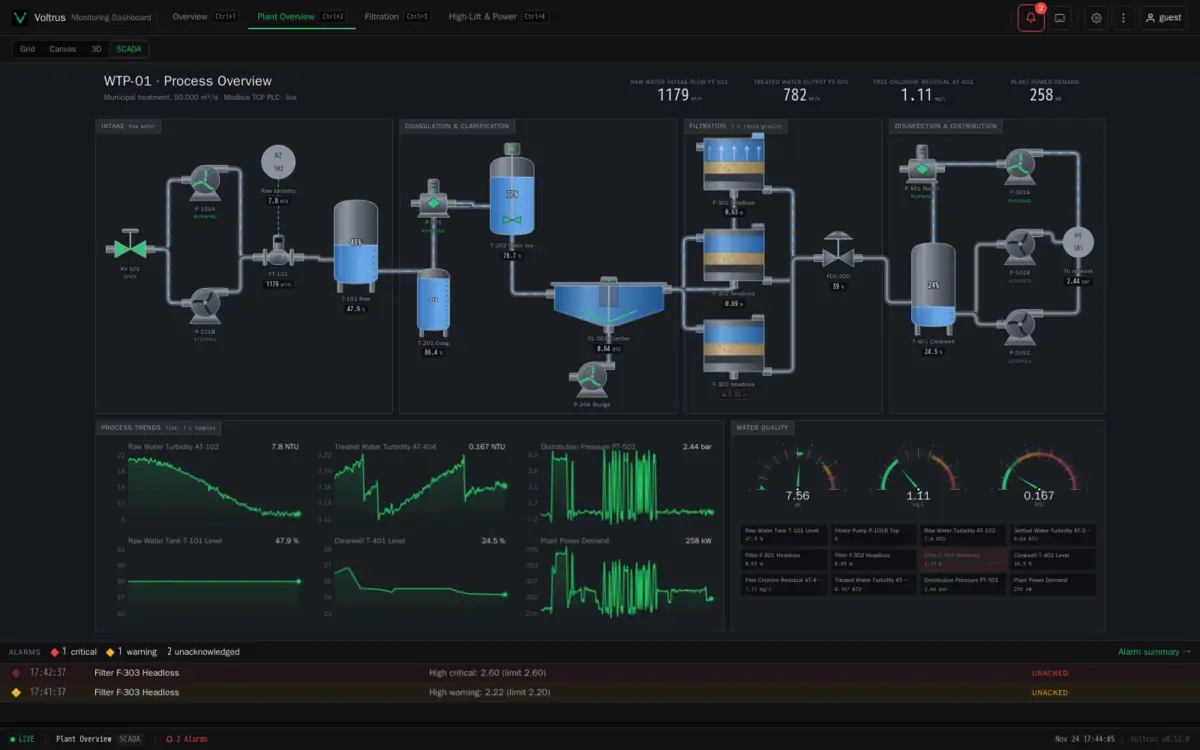
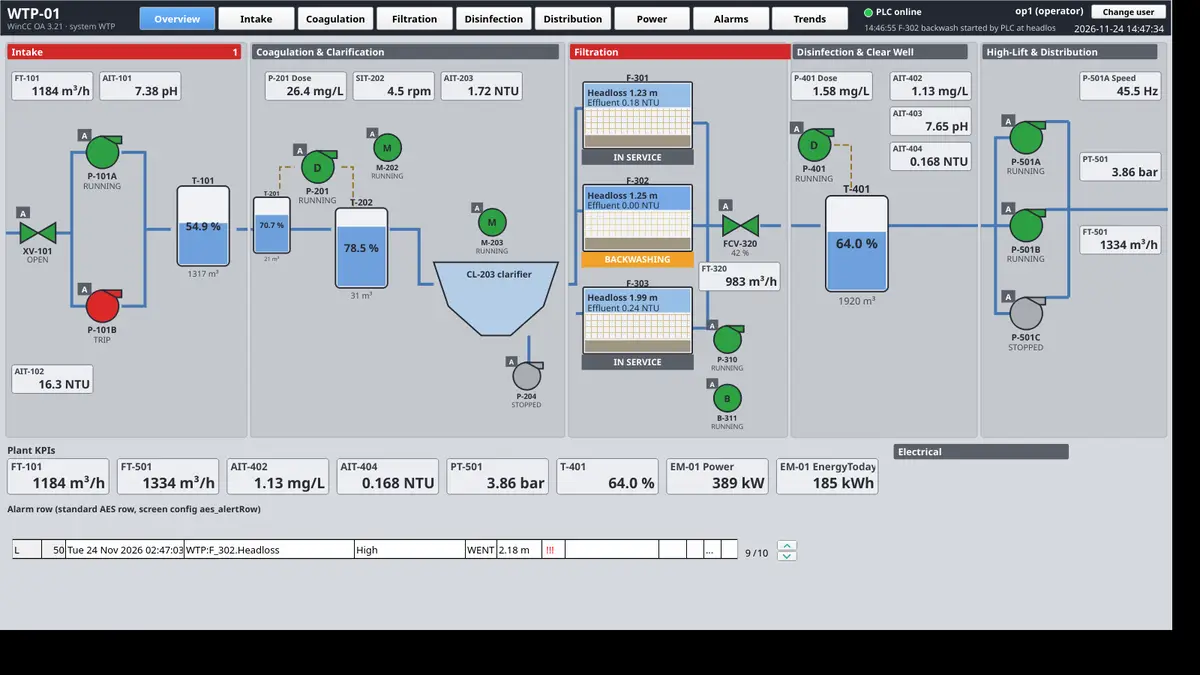
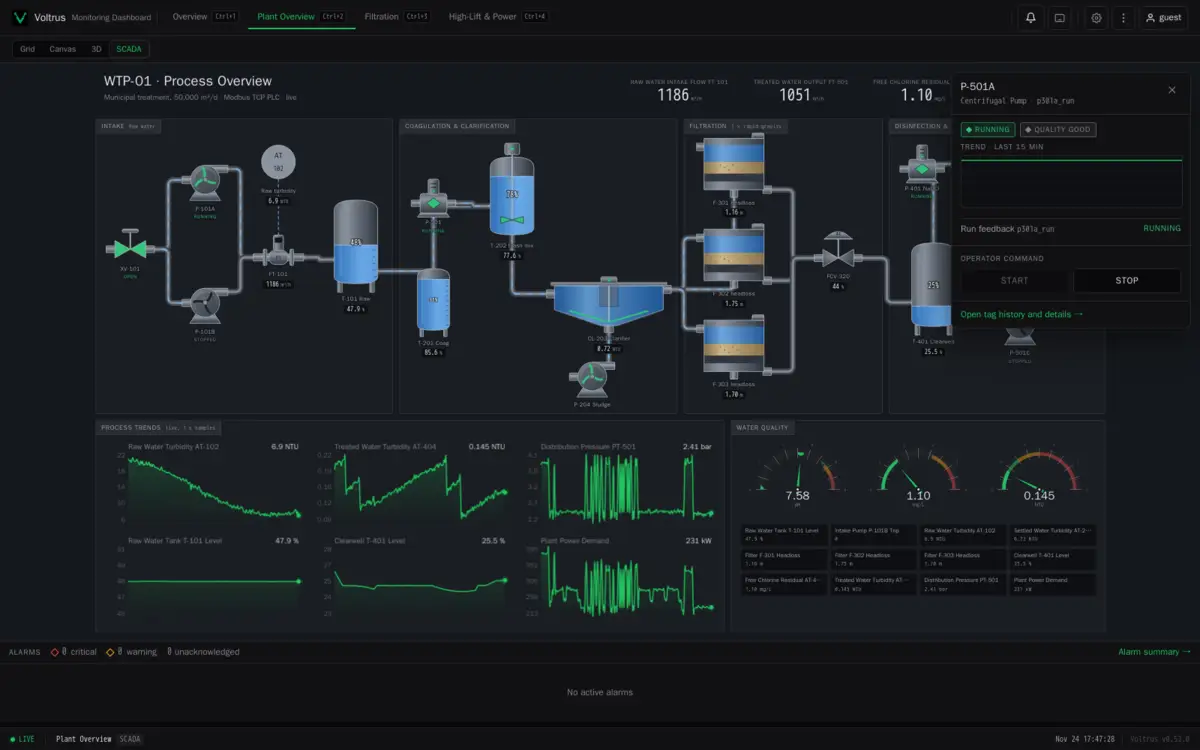
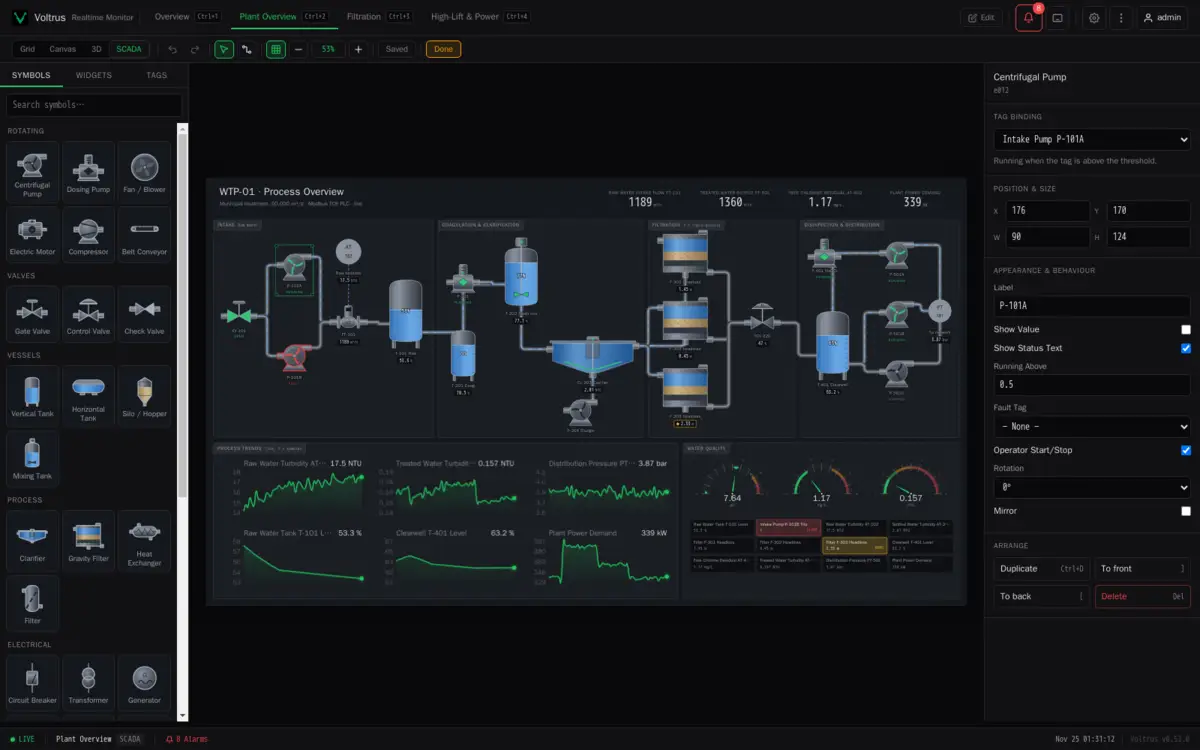
01 · Process overview with live values
Voltrus SCADA 0.52.0. Process overview from the public demo: four process areas with animated pumps and tanks, a trend strip, gauges and the alarm bar.WinCC OA 3.21. Our generated overview in the Vision UI: five areas with alarm counts in the area headers, P-101B shown as TRIP.
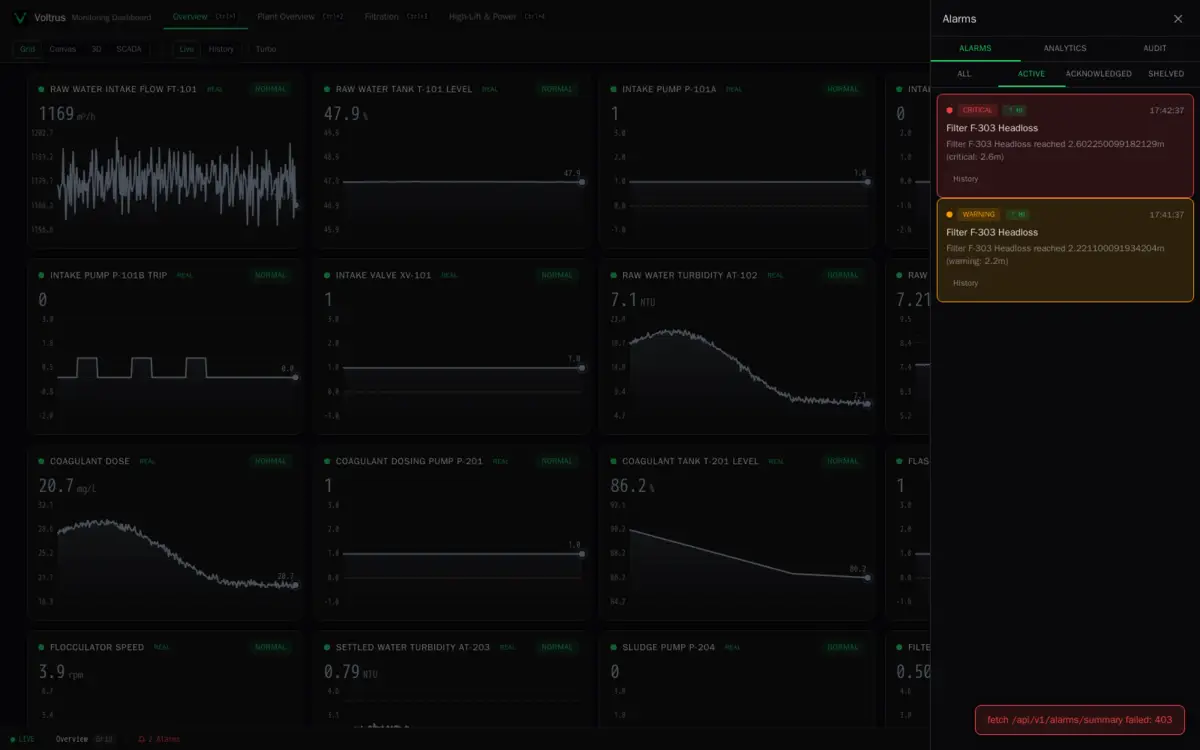
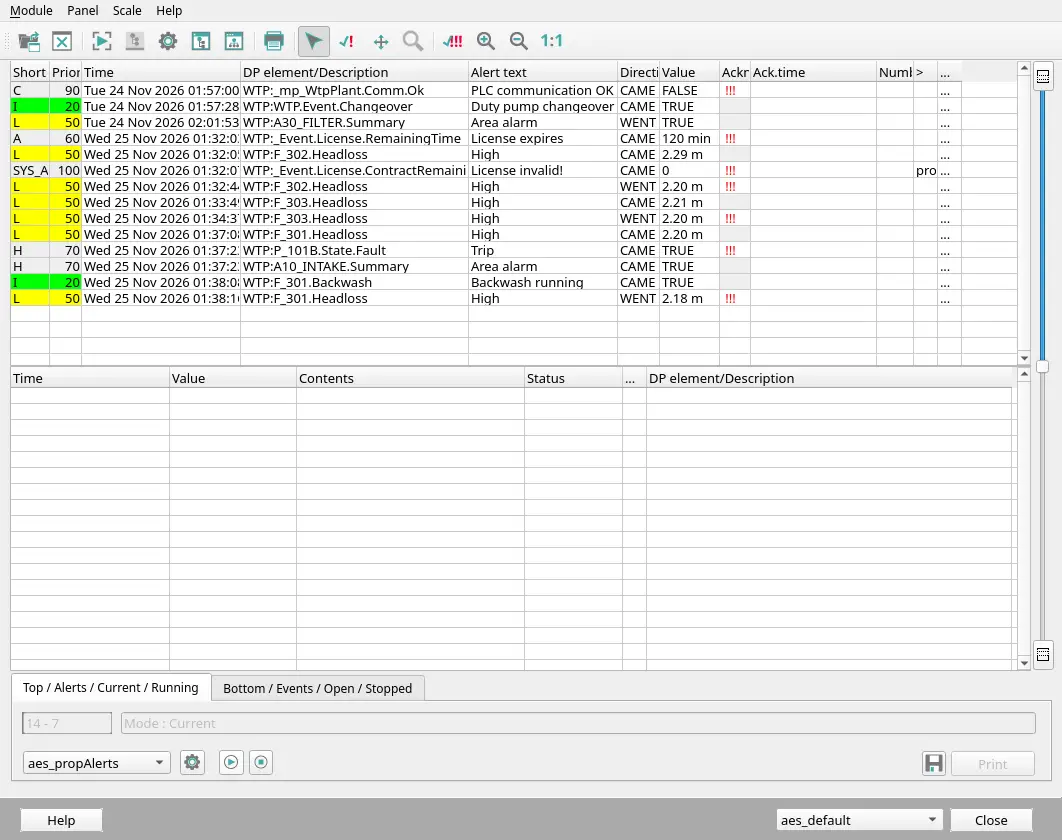
02 · An alarm active
Voltrus SCADA 0.52.0. Alarm panel with a critical and a warning alarm on filter headloss. Seen as guest on v0.52.0: an error toast and an unrounded value, both fixed in v0.53.0.WinCC OA 3.21. Standard alarm screen with our plant's alarms: the P-101B trip and the intake area summary came, filter headloss alerts came and went.
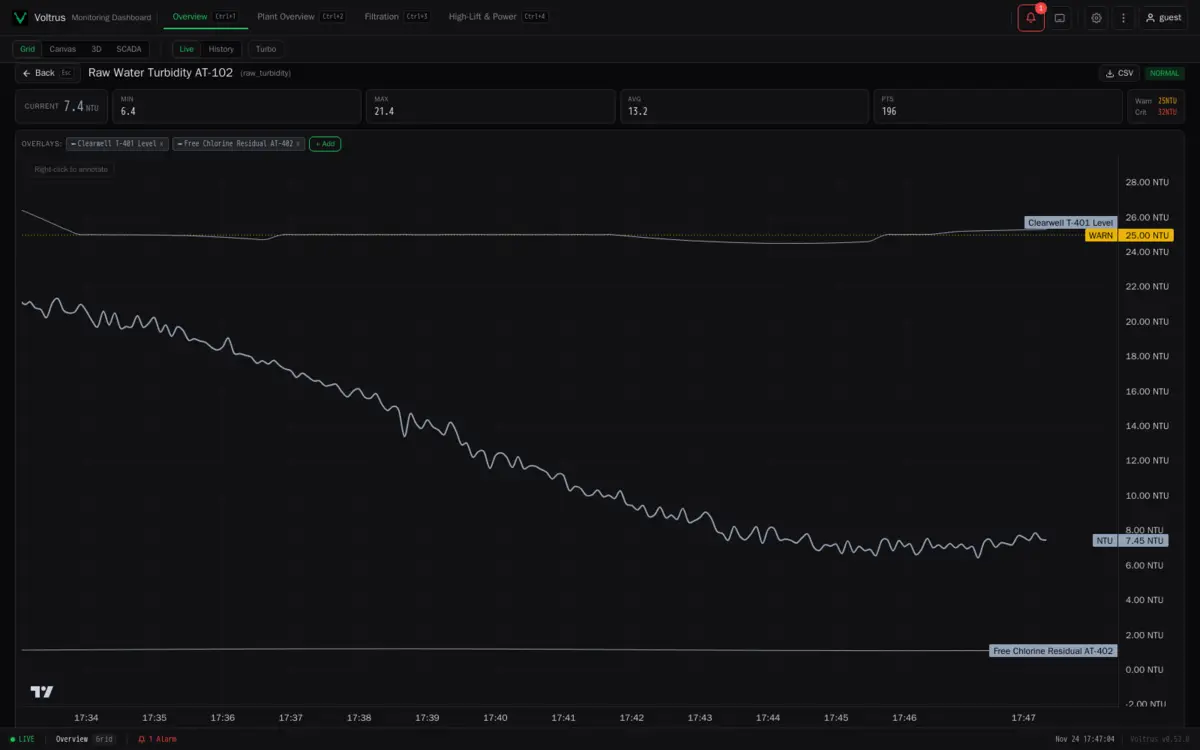
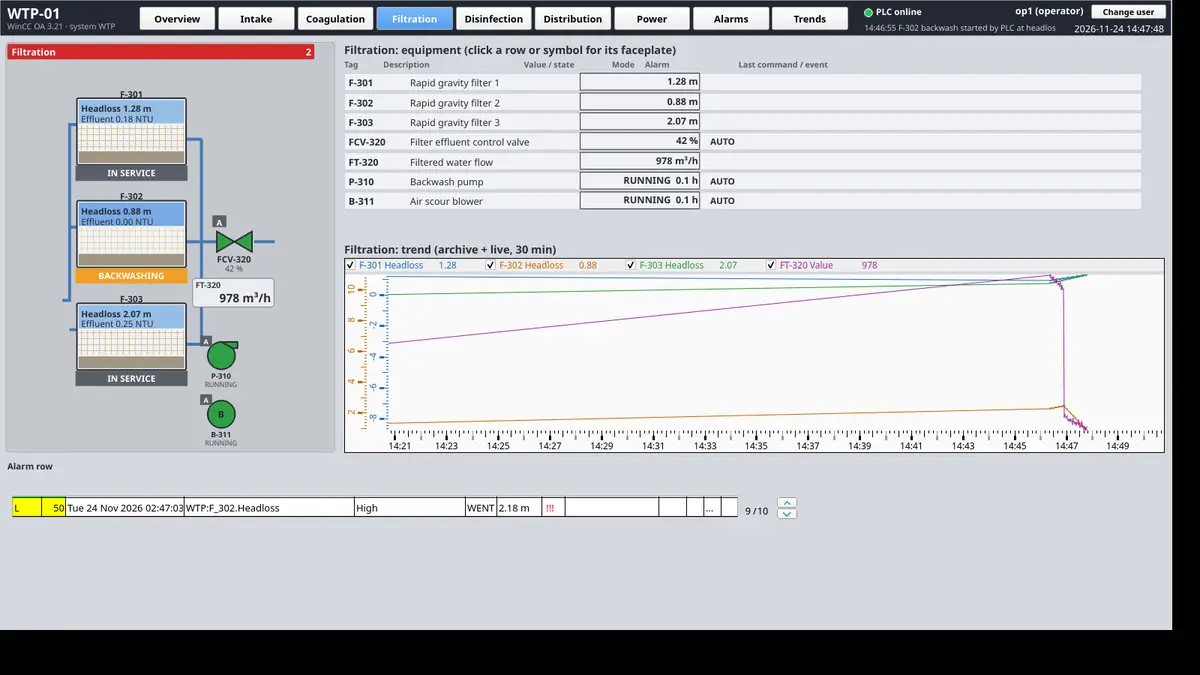
03 · Trend of three tags
Voltrus SCADA 0.52.0. Tag detail for raw turbidity with two overlays. In v0.52.0 overlays shared the main tag's axis; v0.53.0 draws one axis per unit and a multi-pen popup with its own axis per pen.WinCC OA 3.21. Trend on our filtration screen, fed by the archive.
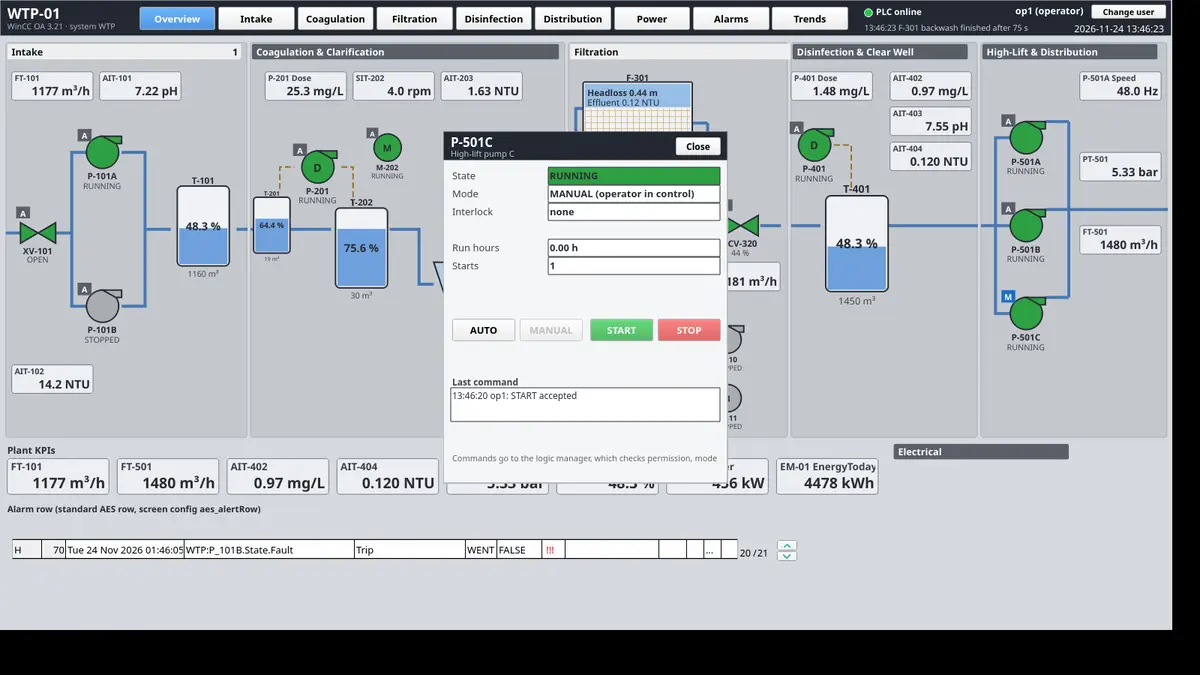
04 · Pump faceplate with START/STOP
Voltrus SCADA 0.52.0. Side faceplate for P-501A: state, quality, 15-minute trend, run feedback and START/STOP. Not pressed: the demo is read-only.WinCC OA 3.21. Pump faceplate opened from the overview: operator START in manual mode, with mode and interlock checks in our logic.
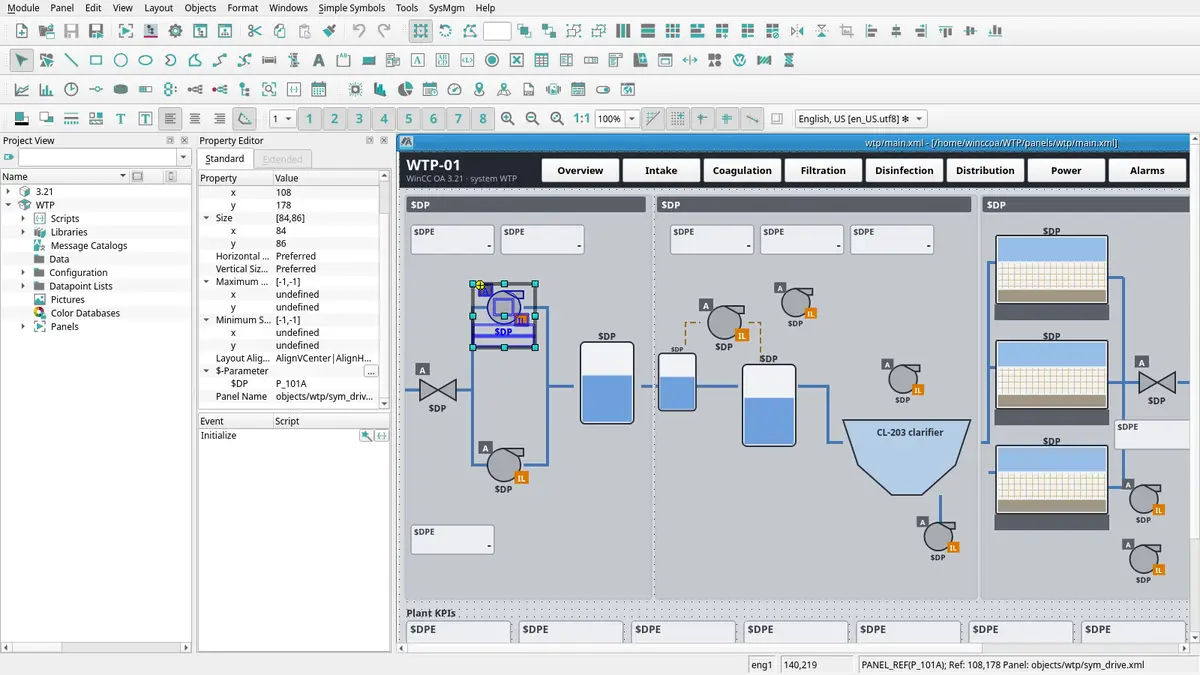
05 · The editor with the screen open
Voltrus SCADA 0.52.0. Browser editor (local v0.52.0): symbol palette, live canvas and the inspector with tag binding and START/STOP for P-101A. Values keep updating while you edit.WinCC OA 3.21. GEDI desktop editor with our main panel: references show their $ placeholders, not live values.
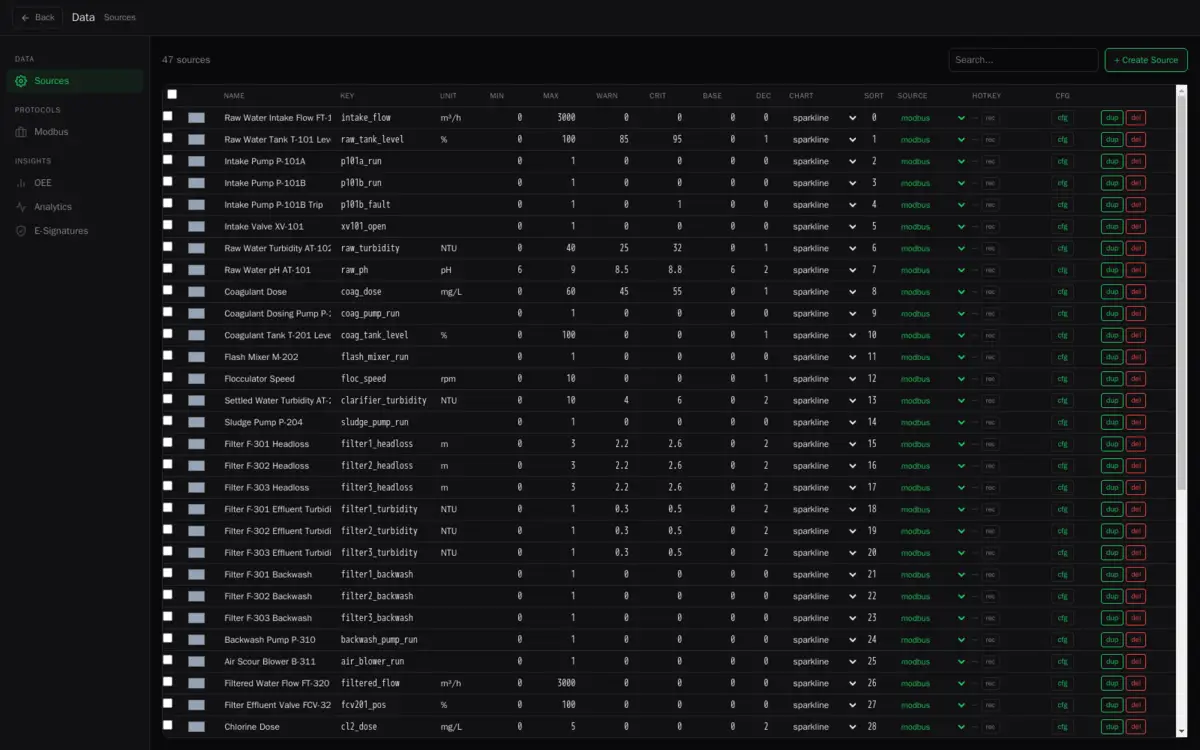
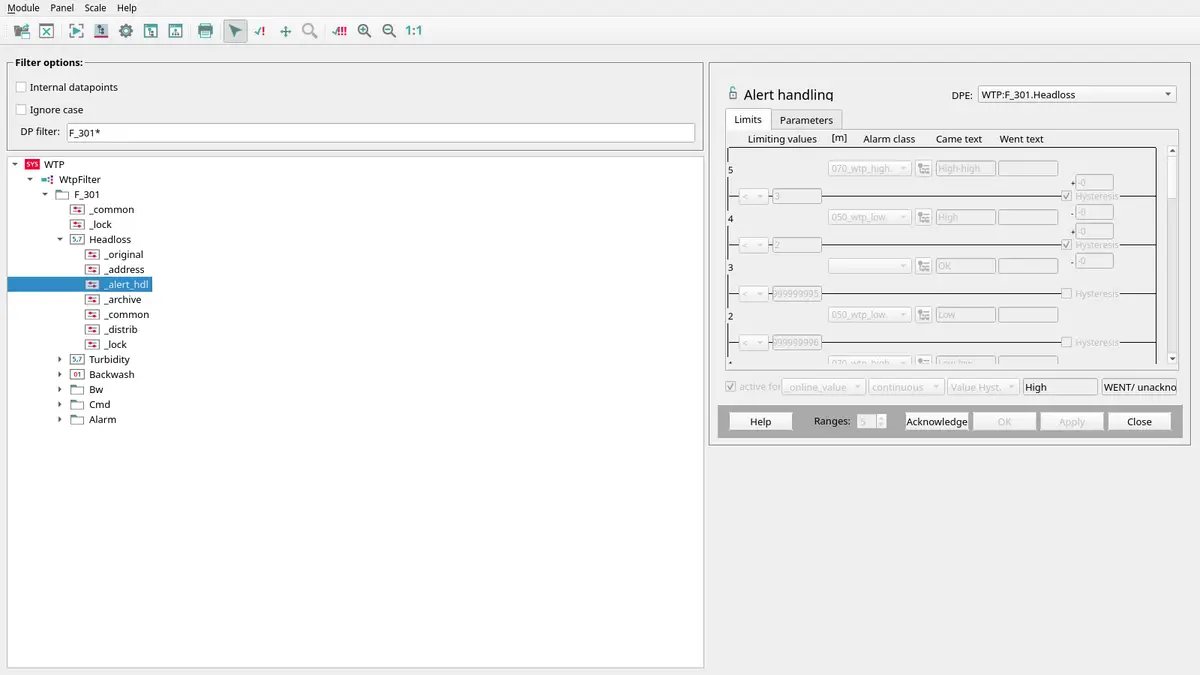
06 · How a tag or pump type and its alarm are configured
Voltrus SCADA 0.52.0. Data sources: one row per tag with unit, range, warning and critical limits, decimals and Modbus source.WinCC OA 3.21. Parameterization of our filter type: a five-range alert with alarm classes and hysteresis, copied from the type's master instance.
Honestly
What WinCC OA does better.
We built the same plant in WinCC OA 3.21 in demo mode: 9 types, 39 instances and 62 I/O points, with control logic, alarms per area and generated panels. It is the deepest engineering platform here, and the largest on disk.
Types with configs per element: address, alarm and archive settings defined once on the type's master instance and copied to every instance. Tested in our lab, 24–25 Nov 2026
Alarm depth: summary alarms per process area with counts in the area headers, discrepancy alarms when feedback does not follow the command, alarm classes and hysteresis. Tested in our lab, 24–25 Nov 2026
Commands checked against user permission, mode and interlocks in the server logic before they reach the PLC. Tested in our lab, 24–25 Nov 2026
Hot-standby redundancy, a disaster recovery system and geographically distributed systems, from small single-site systems to redundant high-end ones. From vendor documentation
What we changed
Lessons we shipped.
Each of these came out of the lab. They shipped in Voltrus SCADA v0.53.0 (25 Nov 2026). Details, commits and tests: lessons implemented.
Tag-swap faceplates: one pump, motor, valve or analog faceplate definition, opened by many symbols, each with its own tags; commands go through the command queue. Shipped in v0.53.0; lesson from our lab, 24–25 Nov 2026
Linked Modbus device templates: fix the register map once and every linked device follows, after a preview. Shipped in v0.53.0; lesson from our lab, 24–25 Nov 2026
Alarm chatter count per tag and an on-delay suggestion from the tag's own noise, offered in the tag editor. Shipped in v0.53.0; lesson from our lab, 24–25 Nov 2026
An official Dockerfile with a CI build (103 MB image, about 29 MiB idle in a smaller scenario); no registry image yet. Shipped in v0.53.0; lesson from our lab, 24–25 Nov 2026
Which to pick
Each one is the right call somewhere.
Pick Voltrus SCADA when
A small or mid-size site that needs a published price, or a free Core in production.
Engineers who want engineering and runtime in one browser app, and many projects on one laptop.
You want AI agents to read the plant over MCP and an open REST API.
Pick WinCC OA when
Large, distributed or redundant systems, or a client whose standard is WinCC OA.
You need deep type-and-instance engineering and alarm handling today (see what it does better below).
You want Siemens as the vendor, with its partners and long-term support.